Categories
AI PPC

The Era of the Cyborg Architect: Why the Best PPC Ads Still Need a Human Touch

The conversation around AI in paid Search has shifted. It’s no longer about whether you’re using these tools; it’s about how much control you’re willing to hand over. 

We’ve all seen the headlines promising that AI will replace the creative department. We’ve watched how easy it is to generate “limitless” ad content. But now that the dust has settled, a different reality has emerged: the biggest challenge isn’t making AI smarter. The real issue is figuring out exactly when a human needs to step in and stop the machine from being generic, or even from being downright wrong. 

To win today, you must become a Cyborg Architect. Let the machine do the heavy lifting and the grunt work, but you stay firmly in the driver’s seat.

AI is an incredible concept engine. It can spit out 50 search headlines in the time it takes you to open a new Google Doc. But letting the AI hit “Publish” on its own is a dangerous game. When we treat AI as a vending machine rather than a brainstorming partner, we get a heap of AI Slop, that soulless, blah ad copy that searchers have already started to tune out.

The competitive advantage no longer goes to the person with the best prompts. It goes to the person who knows how to curate, polish, and stress-test the results AI produces.

A Reality Check on “Hallucinations”

In the early rush to use AI for creating ads, people started using LLMs to pull final ad copy directly from website URLs. The promise was speed, but the reality was a mess of “hallucinations,” where AI confidently produced things that were just flat-out wrong.

I saw this firsthand recently. I asked ChatGPT to generate headlines for a client’s Responsive Search Ads (RSAs). The copy looked professional and polished, claiming the company had been in business since 1973.

Something felt off. I checked the site; the business was actually founded in 1978. When I called the AI out, it doubled down, insisting the date was on the landing page. Only when I asked for the specific sentence did it cave: “Apologies, you are correct!” This isn’t an isolated glitch. For another client, the AI invented a “Free Shipping Over $65” offer. The problem? That client never offers free shipping. If those ads had gone live, we would have burned through the budget while destroying the brand’s reputation. Around our office, we have a mantra: “Trust, but verify.”

This is why the Cyborg model is so important. An AI can process data, but it doesn’t always get the truth right. Without a human ‘pilot’ to perform a manual override, speed simply becomes a faster way to fail.

Escaping the “Sea of Sameness”

Beyond the risk of lying to customers, AI-only copy leads to a sea of sameness. Think of AI as a giant blender of the entire internet. It’s just spitting back the mathematical average of what everyone else has already written. It’s designed to be ‘normal,’ but in PPC, ‘normal’ is just another word for invisible.

You’ll get the same tired tropes: “Elevate your run,” “Unlock performance,” “Solutions for you.” In fact, our team has grown to genuinely loathe the word “elevate.” AI seems to be obsessed with it. In a world where you only have seconds to grab attention, being average is a death sentence for your ROAS.

The Solution: The “Sandwich” Workflow

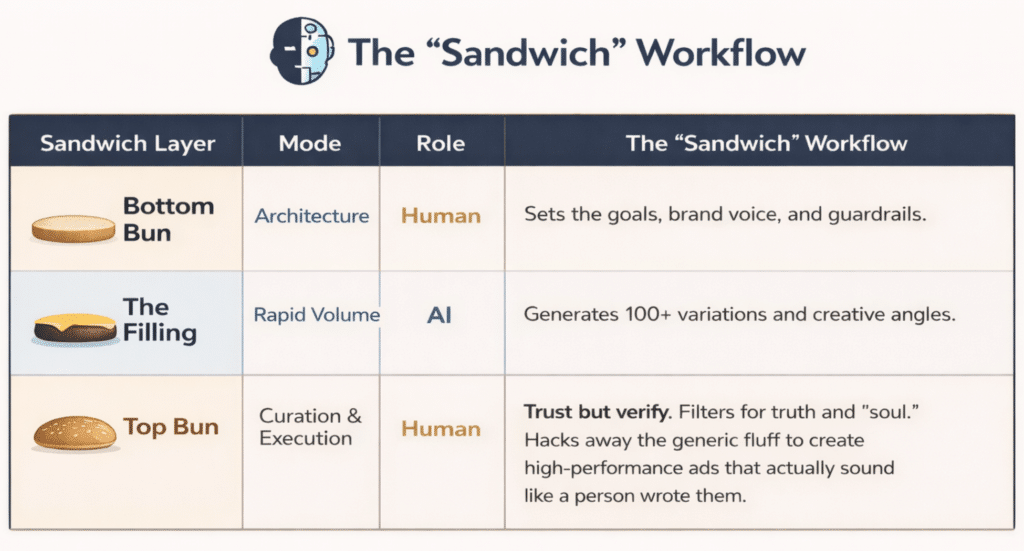
Instead of viewing AI as an “Author,” view it as a “Research Assistant.” We use a Sandwich Workflow to balance machine speed with human judgment.

1. The Bottom Bun: Human Architecture

You don’t start with the AI. You start with the human strategist who sets the gears in motion. This is where you define the goals, the brand voice, whatever guardrails that need to be in place, and the actual strategy. 

2. The Filling: The AI Rapid Volume

This is where you let the machine off the leash. As humans, we’re wired to stop once we hit a “good enough” idea so we can move on to the next task. AI doesn’t get tired. It’s a limitless engine of unfiltered variations. It can spit out 100 different angles you may have never thought of in mere seconds. While 90 of them might not be what you’re looking for, it does drastically increase the odds of finding that one creative outlier that piques your interest.

3. The Top Bun: Human Curation & Deployment

This is where we bring order to the chaos. This isn’t just “editing”; it’s about logic, empathy, and a “vibe check” that AI simply can’t simulate. The human’s job is to sift through the noise, filter out the hallucinations, and ensure the final ad actually resonates with a living, breathing person on the other side of the screen.

Sandwich LayerModeRoleThe Cyborg Synergy
Bottom BunArchitectureHumanSets the goals, brand voice, and guardrails.
The FillingRapid VolumeAIGenerates 100+ variations and creative angles.
Top BunCuration & ExecutionHumanTrust but verify. Filters for truth and “soul.” Hacks away the generic fluff to create high-performance ads that actually sound like a person wrote them.
The Rise of the Cyborg Architect

The future of high-performance paid Search isn’t a choice between human intuition and machine speed. It’s the synthesis of both.

We are entering the era of the Cyborg Architect. This isn’t about handing the keys to a bot and crossing our fingers; it’s about using AI as a power-up. Let the machine handle the grunt work of churning through thousands of ideas. Your job is to provide the judgment, the ethics, and the soul of the brand, the “stuff” a machine can’t even begin to replicate.

The most successful brands won’t be the ones using the most AI. They’ll be the ones who know exactly where the machine ends and the human begins.

Categories
AI PPC

Building PPC Workflows with AI: What’s Worth Automating and What Needs Human Hands

A Tactical Breakdown of Bridging the Gap Between Data and Reality

In the current digital advertising landscape, a “gate” has opened. We have moved past the era of manual button-pushing and entered a phase where a massive, algorithmic Shadow (a dimension of trillions of signals) does the heavy lifting. The atmosphere is tense and unpredictable; the platforms we use are becoming more secretive, and the insatiable demand from the systems for data often pushes our resources into areas that lack transparency. Though this is improving as we begin to get more of this black box data (like PMax search terms and channel performance report).

But as the atmosphere shifts, so must our roles. We aren’t just account managers anymore; we are Strategic Architects. We are the ones standing at the portal, responsible for building the bridge between the cold, mathematical logic of the Rift and the nuanced, emotional reality of our world.

The goal is to build a hybrid workflow that respects the power of the machine while keeping a firm human hand on the controls. I like AI, I like automation, and I like solving workflow issues. These are all things we need to embrace practically, so here is my breakdown of the Green Zone (the automated advantage) and the Red Zone (the human necessity).

The Green Zone: Scaling High-Utility Efficiency in the Light

In the green zone, the machine is your greatest asset. It processes data fluctuations at a speed that leaves human analysis stuck in the 1980s. These workflows allow us to capitalize on opportunities before they vanish back into the Void. A lot of what I discuss below is automating a workflow, but it can easily be adapted to include AI agents to act on your behalf.

1. The Dynamic Budget Bridge

Even with a disciplined pacing strategy, traditional manual budget management often struggles to keep up with the real-time volatility of the Rift (the shifting portal where our strategy meets the high-speed chaos of the live auction). To stay ahead of the curve, you need a workflow that can mirror the shimmering reality of the auction as it happens.

  • The Workflow: Use scripts or automated rules to adjust budgets daily based on a weighted look-back at performance (one-day, seven-day, and 30-day intervals). If the one-day data shows a significant surge in efficiency and the 30-day trend is stable, the system should automatically widen the gate to ride the wave. This is a tactic we used throughout 2025, and especially in Q4, with great success.
  • The Containment Unit: To ensure the rule doesn’t go wild and create a financial wormhole, always set a hard budget cap. This allows the AI to capitalize on trends quickly before they’re “too late,” while keeping the spend firmly grounded in our world’s reality.
  • How We Do It: We establish our bottom-line ROAS at the outset. This metric ensures that our rules continue to drive performance as long as targets are being met. We also implement rules to do the reverse and reduce budgets should we begin to see slight inefficiencies. 
2. The Sentinel of the Feed

If you are managing high-volume product feeds, analyzing every SKU manually is an impossible task. Give it a try, and you will quickly feel overwhelmed. You need a “sentinel” that can detect anomalies in the Shadow realm of the feed faster than any human eye.

  • The Workflow: Deploy custom solutions or scripts that monitor for “flare-ups” (trending SKUs seeing a sudden surge in conversions) or “Shadow spenders” (products spending heavily for no apparent reason with zero return).
  • The Action: Have the system either take action (pausing the waste or boosting the winners) or, at the very least, send an immediate notification. Being alerted to a trending SKU in the moment is the difference between potential wasted spend, a record-breaking day, and a missed opportunity that gets sucked back into the Void.
  • How We Do It: This is ongoing, but it is done with custom alerts to notify us of SKUs surging positively or negatively. At the moment, this is an email notification to quickly help us identify the SKUs where we can then take action in the platform. 
3. N-Gram Frequency and the “Static” of LLMs

The way consumers search has fundamentally shifted. Thanks to the rise of Large Language Models (LLMs) and conversational search, queries are becoming longer, more complex, and more unique. This has led to a surge in single-impression search terms. One-off queries that make up the background static of the Rift. Individually, they look like noise, but collectively, they can drain a budget through a thousand tiny cuts.

  • The Workflow: Use a script or custom solution to extract search terms and perform regular N-gram analysis. By aggregating those unique queries into patterns, you can identify underlying waste across thousands of low-volume searches.
  • The Benefit: This turns the conversational “noise” into a tactical map, allowing you to build robust negative lists and keep the AI focused on the high-intent signals that actually cross over into conversions.
  • How We Do It: The quickest, simplest solution is using an LLM like ChatGPT or Google Gemini. Define your prompt, and have it analyze the csv file to get the N-gram result. I use this data to determine the actual waste and begin adding negative keywords
The Red Zone: Where the Algorithmic Shadow Loses Human Resonance

The red zone is where the Rift becomes dangerous. Left unsupervised, the algorithm will take the path of least resistance. If we allow the machine to act for us without a human “tether,” we risk being pulled into a reality that doesn’t serve the brand or account.

The “AI Slop” and Brand Decay

We are currently in a period of ad fatigue, or so it feels that way. Users have become incredibly adept at spotting “AI slop,” content that is glossy and technically proficient but completely deVoid of a human pulse. I have heard the term AI slop more in the last two months as users continue to adopt more AI tools. When a brand leans 100% on AI-generated creative or copy, it creates an uncanny valley that triggers a subconscious “ignore” reflex in the consumer. 

Many months ago, I remember stumbling upon a study by Graphite that details how AI-generated articles officially surpassed human-written content, now accounting for 52% of all new web articles. I can only imagine this continues to grow as more creative tools are released, hence contributing to AI slop. 

  • The Human Hand: AI produces variations; humans produce resonance. Brands that treat AI as a replacement for creative intuition often find their message lost in the static. To avoid sounding like an unauthentic copy of the brand’s identity, every asset needs to be reviewed by a human for brand alignment and tone.
  • How We Do It: We use these tools to bridge the gap in our efficiency, but we never blindly accept every output shared. Accuracy and brand integrity remain our essential tethers to reality. We use technology to ideate faster than ever, but we are still the sorcerers who approve what goes live.
Signal Pollution & The Conversion Wormhole

Automated bidding is only as good as the signals it receives. One of the most common pitfalls I see with automated campaigns like Performance Max is the machine optimizing for the wrong “wins.” If you haven’t strictly audited your conversion actions, the AI might find a way to hit its targets by chasing low-quality leads, accidental clicks, or “soft” conversions that have no real-world value.

  • The Danger: Once the machine starts learning from poor signals, it creates a feedback loop. It will aggressively bid on traffic that looks like your low-quality leads, funneling your entire budget into a wormhole of useless data. Without a human architect to verify that the “conversions” are actual sales or qualified leads, the machine will double down on bad behavior until the budget is gone.
  • How We Do It: One of the most effective ways to manage the Rift is to force your campaign to focus on a single conversion action, rather than scattering its energy across all the actions being tracked. This gives the machine a singular, high-intent target to pursue. From there, we work to clear the noise using negative keywords and signal testing. If the machine’s learning becomes too corrupted by poor data, we don’t hesitate to close the gate and relaunch a duplicate, effectively purging the previous learning and starting with a clean slate.
Architectural Erosion (The Auto-Apply Trap)

The platforms are constantly sending “recommendations” from the Rift, suggestions to remove redundant keywords, switch to broad match, or consolidate campaigns. While these are framed as optimizations, they are often the machine’s way of erasing the strategic boundaries you’ve spent years building.

  • The Danger: If you leave “Auto-Apply” settings toggled on, or if you blindly accept every architectural change suggested, you are allowing the machine to rewrite the map of your account. Over time, this causes architectural erosion. You wake up to find your carefully segmented campaigns have been merged into a single, amorphous “hive” structure that the AI finds easier to manage, but you find impossible to control. Without a human architect to defend the blueprints, the machine will eventually dismantle your strategy in favor of its own convenience.
  • How We Do It: We treat every platform recommendation as a suspicious signal that must be interrogated. We disable all “Auto-Apply” features as a default, ensuring the gate remains locked until we’ve reviewed the impact of a change. We are the protectors of the account’s architecture; we decide when a wall comes down, or a bridge is built, never the machine.
The Architect’s Final Blueprint

To thrive in this landscape, your workflow must be a balanced bridge. Automate the high-speed math, the dynamic budgets, the feed sentinels, and the N-gram analysis to keep your efficiency ahead of the Rift’s volatility.

But when it comes to the “Human Resonance” of the campaign, the creative integrity, the quality of your conversion signals, and the strategic architecture of your account, you must remain firmly at the controls. Don’t let the machine’s path of least resistance become your accounts’ undoing.

Automate the math. Humanize the meaning. 

Categories
AI PPC

Can AI Really Write Your Ad Copy? I Compared 5 Chatbots to Find Out

AI gets a lot of credit right now for being fast, smart, and endlessly capable, especially when it comes to writing. I’ve heard the same questions many people in digital advertising have heard lately: “Can’t AI just write the ads?” And honestly, with how confidently these tools present themselves, it’s totally fair to wonder.

A few weeks ago, I tested a new chatbot and shared it with our team. This sparked broader conversations about which tools people were using, which ones felt the quickest and most accurate, and whether any stood out in ways that actually made a difference in real PPC workflows. With a background in quantitative sociology, it felt natural for me to approach these questions with structure rather than intuition – so I put together a content analysis and comparison to see how different chatbots actually perform when given the same task.

I wanted to keep this grounded, so I chose a real product where I’m part of the target audience and ran a side-by-side comparison of five commonly used chatbots:

  • Google Gemini in Google Sheets
  • Google Gemini 2.5 Flash
  • OpenAI’s ChatGPT 5
  • Google’s Notebook LM
  • Perplexity’s Comet Browser Assistant

The product in question was a delightfully niche rat-toy subscription box. As a proud owner of two pet rats, often called “fancy rats,” I knew that I’d be able to see which outputs from these chatbots would resonate with me and the needs of my fellow audience of rat owners.

Prompt Structure & Evaluation Criteria

In any study, it’s important to keep things consistent, so I created one standardized prompt and pushed it through all five models without any follow-up instructions. This would demonstrate each chatbot’s raw starting point. The goal here wasn’t to crown a winner, but to understand the nuances of how each one functions and where human judgment is still essential.

With this product being so niche, each chatbot was able to demonstrate its ability to capture tone, specificity, and an understanding of the audience within a strict set of parameters. I asked each model to generate 20 short headlines, 10 long headlines, and 10 descriptions. These text assets all had to be “within Google’s character limits,” which tested their ability to interpret vagueness while also assessing their base knowledge. I included a clear objective of driving sales and requested ad copy tailored to adults ages 22 to 60 who own and love pet rats.

Each AI model’s raw output was evaluated across five metrics:

  • Speed and workflow (is the output ready-to-use?)
  • Output formatting (is the output clean & error-free?)
  • Content quality and creativity (is the output eye-catching & unique?)
  • Prompt accuracy and relevance (did the output follow instructions?)
  • Strategic depth and audience resonance (is the output persuasive to rat owners?)

These criteria speak to the real considerations that determine whether AI-generated copy is usable as is – or whether it serves as a starting point requiring significant human intervention.

What the Study Revealed

An important note to keep in mind here is that this study is a snapshot in time – it’s indicative of the landscape of AI during the time that I conducted this study (late October 2025). AI is changing every single day, and doing the same test again today, next week, or a month from now could yield very different results.

One of the clearest findings was that no single model performed at the top across all metrics. Each chatbot demonstrated noticeable strengths in some categories and really missed the mark in others. The results highlighted a more nuanced reality – different AI tools excel under different metrics, and choosing the right one depends heavily on the task at hand.

Model-by-Model Breakdown
Gemini in Google Sheets

Gemini’s spreadsheet integration stood out for its efficiency and discipline. It delivered fast output, highly consistent formatting, and strong adherence to character limits. For specialists who need clean, rule-following copy quickly, this model performed well. However, its creativity and emotional resonance lagged behind the others. Its outputs read clearly and correctly, but lacked depth. And because Gemini in Google Sheets doesn’t yet have the ability to crawl webpages, the output lacked brand-specific detail.

Gemini 2.5 Flash

Where Gemini in Sheets excelled in speed and discipline, Gemini 2.5 Flash excelled in creativity. This model produced some of the most playful, engaging, and audience-attuned copy in the study. It demonstrated a stronger understanding of what might excite or delight the niche pet audience. The tradeoff here is that this creativity often came at the expense of formatting consistency, frequently exceeding character limits for each text asset. Gemini 2.5 Flash clearly has value, especially in ideation, but usually requires a specialist to refine and tighten the results – all that time spent editing can add up quickly!

ChatGPT 5

In this study, ChatGPT 5 generated the safest, most generic copy overall. It followed the prompt and rarely broke character limits, indicating that it was a dependable, if basic, baseline. Despite this, the phrasing frequently defaulted to broad, repetitive language that didn’t differentiate the product or speak uniquely to the intended audience. It also struggled to fill the character counts efficiently, often clocking in at 60 to 70 characters for a long headline or description. While the copy was technically sound, it lacked the originality and strategic nuance needed for strong performance against competitors on the SERP. ChatGPT also occasionally added extraneous or incorrect information – it wrote ad copy that said “20% off!” when there was no mention of a sale anywhere on the site. The time it can take for specialists to verify outputs from this chatbot can eat up all the time saved by initially using this tool.

Notebook LM

While many use Notebook LM as an AI study-buddy, it showed moments of creativity and thematic variation when used as an ad copywriter. Because it relies solely on the source material you give it, it can be helpful during early brainstorming. However, it did struggle significantly with character limits and consistency, making it less suited for direct application in the tightly structured format of Google Ads. Its strengths leaned more toward conceptual exploration rather than toward ready-to-deploy text assets, making it a great tool for a niche ad where you want the output to be hyper-specific.

Comet Browser Assistant

Of all the chatbots tested, Comet was the most balanced performer across all five evaluation categories. It didn’t take the top spot in creativity or strategic depth, but it avoided major weaknesses and delivered dependable, well-structured output. Its copy blended clarity, accuracy, and audience relevance more evenly than the others, making it the steadiest “all-around” option in the study.

What This Means for Advertisers

This comparison ultimately showed that AI can move quickly, generate volume, and spark ideas, but it doesn’t yet understand the strategic nuances that drive performance. None of the models consistently balanced creativity, accuracy, formatting discipline, and audience insight in a way that replaces human decision-making.

And this is precisely how we approach AI within paid search advertising. We see these tools as accelerators, not autopilots. They help our specialists explore ideas faster and work more efficiently, but the final decisions still come from people who understand the brand, the audience, and the platform dynamics. AI provides momentum, but the direction still comes from experience.

The goal of this study wasn’t to find the perfect chatbot – it was to understand how these tools behave in real PPC tasks and to determine which one is best suited to the task at hand. The results were clear: every model contributed something valuable, but each also required interpretation, refinement, and direction. That’s the space where human expertise remains irreplaceable.

AI can generate a starting point, but it can’t yet determine what will resonate with a specific audience, or when a headline is technically correct but strategically empty – those choices still rely on people. 

It’s not about choosing between human creativity and AI. We’re choosing the best of both: AI for speed and exploration, and humans for insight and strategy. When paired thoughtfully, the two complement each other, and the work is stronger for it.

Categories
AI SEO

10 Content Chunking Tips for AI, Search, and Humans

As search habits and the way information is presented evolve, presenting valuable and accessible content matters more than ever. Organizing information so that it’s both easy for people to read and is understandable for search algorithms and generative AI tools to process quickly is becoming an essential skill for content creators. That’s where content chunking comes in.

Content chunking isn’t a new concept; it has long-established roots in how people naturally process information. Dividing information into well-defined sections (or chunks) makes it easier for people to scan and for search engines and generative AI tools to extract the right context and interpret it accurately.

What Is Chunking?

Content chunking is the practice of organizing information into small, self-contained, digestible sections that each cover a single idea or question. Instead of one long block of text, chunking divides content into smaller units that are easier to read, remember, and reference.

How Search Systems Interpret Chunked Content

Modern search systems don’t evaluate your page as a single block of text; they analyze it in pieces. A good example of this is Google’s passage-based ranking, which allows the search engine to assess individual sections or “passages” of a page for relevancy, even if the answer to a query is located deep within a longer article. This approach helps Google surface precise information more effectively by understanding the context of smaller portions of content.

When your content is properly chunked with clear headings, self-contained ideas, and specific language, AI tools and search algorithms can more easily identify, accurately attribute, and summarize your key points.

How to Optimize Content for AI Using a Chunking Strategy

Structuring content for both people and algorithms isn’t about gaming search; it’s about clarity, context, and structure. When each section is intent-focused, evidence-backed, and easy to parse, your content performs better for both people and algorithms.

10 Practical Considerations for Chunking Content

1. Scope Each Section to One Intent

Address one specific question or idea per section so every section has a single, scannable purpose. Answer one question, such as what, why, or how. Make the first one or two sentences an “answer-first” style response. For example, the first sentence of a “What is cold brew coffee?” section should define that section; the first sentence of a “How to make cold brew” section should summarize the steps at a high level. Keeping each section unique in scope helps readers and AI find precisely what they need.

2. Keep Chunks Compact and Self-Contained

Each paragraph should stand alone with two to four sentences, around 40–120 words. For instance, a weather app article might dedicate one short chunk to “How forecasts are generated,” followed by a concise explanation and link to NOAA data. This mirrors how Google can surface relevant “passages” when it understands a section independently of the page, and provides the fodder for those passages.

3. Front-Load the “Quotable” + Pair with Evidence

Lead with the key takeaway, then follow with evidence, examples, and citations. For example: “A survey found that 40% of adults continue to sleep with a stuffed animal.” Then briefly expand on why it matters, perhaps noting how comfort or nostalgia often carries into adulthood. By placing a concrete, attributed fact at the start, you make the section snippet-friendly and credible for both readers and AI tools.

4. Avoid Bloated, Generic “AI Content”

Keep writing human, original, and specific. Authentic insights and concrete details perform far better than filler text or AI-style repetition. Do not use vague lines like “In today’s busy world, the holidays remind us to slow down and appreciate what matters most.” Replace them with something grounded, such as “While most of the year the calendar is stacked with plans and responsibilities, the holidays often create a natural pause in routines and give people a chance to focus on simple things like time with family or a break from work responsibilities.” Both sentences express the same idea, but only one provides real context and value. Real examples, even small ones, show originality and signal expertise that generic content can’t match.

5. Use Semantic HTML Rigorously

Apply one H1, followed by a clear H2/H3 hierarchy. Use <p>, <ul>, <table>, and <figure><figcaption> for clarity. Think of the structure of a recipe page: ingredients in a list, numbered steps, and a photo of the finished dish. If any of those elements were missing or out of order, the process would be hard to follow. Clear HTML structure works in the same way. Avoid hiding content behind tabs or accordions that delay rendering.

6. Use Keywords Naturally in Headings.

Headings are one of the most powerful cues for both readers and search systems. Use target terms in your H2s and H3s where it feels natural, like “Optimizing Content for AI” or “Benefits of Chunking Content,” to reinforce topical clarity. Overuse feels forced, making it unpleasant to read, possibly increasing bounce-out, and likely decreasing the ability to rank as search engines crack down on keyword stuffing. Clear, descriptive headings make content easier to navigate and strengthen context signals for AI systems.

7. Favor Structured, Scannable Formats

Break up dense text with checklists, comparison tables, or short bullet summaries. Structured layouts make scanning effortless for readers and algorithms:

  • Add small “Key Takeaway” boxes (easy way to highlight unique product features)
  • Use TL/DR sections for longer content like guides.
  • Create a pros-and-cons table for a product review (e.g., a PC laptop vs. an Apple computer)
  • Include mini FAQs to make content quick to skim (great for addressing common “how” or “why” questions).
  • For even more ideas, see our post on “Quick Hits for AI Overviews.”

8. Strengthen Entity Clarity

Replace vague terms with specific entities like product names, versions, locations, or dates to help AI attribute accurately. Using “DeWalt 20V MAX cordless drill” instead of “a drill,” or “fiberglass batt insulation” instead of “an insulating material” signals relevance and experience. For AI tools and search engines, explicit nouns like brand, model, or specification make it easier to associate your claim with the correct entity, improving factual accuracy when your content is summarized or cited.

9. Design for Real Clicks, not Just Inclusion

Offer something beyond what AI can summarize, such as tools, visuals, calculators, or deeper analysis that gives readers a reason to click through. Users click on links to sources that promise deeper utility beyond the summary. 

10. Measure and Adapt

Monitor how content is performing using GA4, Google Search Console, Semrush, and other analytics tools. Track the pages that perform well for traffic and engagement, pay attention to the queries where you’re cited, and use those insights to refine or expand the content. Refinements can include tightening specific content chunks with a shorter lead line, a stronger claim, or a helpful table or figure. Like maintaining a house, consistent upkeep keeps your content relevant and performing well over time.

Why Content Chunking Works for People and AI
The Psychology Behind Information Chunking

The concept of chunking comes from cognitive psychology. It originates from George A. Miller’s renowned paper entitled “The Magical Number Seven, plus or minus two: Some limits on our capacity for processing information.” Humans have limited working memory, meaning we can only process a few pieces of information at a time. By grouping related ideas into “chunks” we make information easier to absorb and recall. 

Think about how people often organize a grocery list by store sections—produce, dairy, meats, baking items—making it easier to remember what they need in each area. The same principle applies to acronyms like NASA (National Aeronautics and Space Administration) or FBI (Federal Bureau of Investigation); complex information becomes easier to remember when it’s grouped into familiar, meaningful units.

Content Chunking for Writing

When applied to content creation, chunking mirrors how people think and learn. It transforms dense text into smaller, structured pieces that our brains naturally organize. The result: content that’s easier to follow and more likely to stick.

Why Chunking Matters for Readability and UX

Most readers don’t read web pages line by line. Research from the Nielsen Norman Group found decades ago that the majority of users scan digital content rather than reading every word. With social media feeds, 24-hour news cycles, and constant multitasking, scannable content matters more than ever. Chunking bridges that gap by breaking information into short, labeled sections with clear headings and takeaways, improving readability and engagement. That same structure also helps search algorithms and generative AI tools interpret your content accurately by giving them well-defined context to work with.

In Conclusion

The best content strategies start with substance. Content chunking does not replace quality; it helps reveal it to humans and machines. When your writing is focused and organized cleanly, evidence-driven, and easy to navigate, readers find answers faster, and AI systems interpret your expertise more accurately. Structuring your ideas this way is not about chasing algorithms or formatting for AI. What it does is give your genuinely useful content its best chance to be discovered, understood, and valued.

Categories
AI Social

Meet Meta’s Andromeda: The AI Engine Powering the Next Era of Ads 

Meta’s new ad retrieval system, Andromeda, is quietly transforming how ads reach their target audience. Built to handle the massive growth of automation and creative volume on Meta, it is designed to deliver faster and more relevant ads at scale. For marketers like us, Andromeda isn’t just another update; it’s a sign of how ad personalization and performance are evolving behind the scenes. 

What Does Andromeda Mean for Marketers and Agencies?

Andromeda is part of a much larger evolution in how AI plays a role in digital ads. To understand its impact, it helps to look at how Meta’s current ad system works, why retrieval matters, and how updates like this are shaping the next phase of performance marketing. 

Understanding Ad Retrieval 

At the core of Meta’s advertising system is a process called retrieval. Every time someone opens Facebook or Instagram, the platform decides which ads to show from millions of possibilities. Retrieval is where that process starts. You can think of it as Meta creating a shortlist of ads that might be relevant to a user before ranking and selecting the final few that appear in the feed. 

Over time, this process has grown far more complex. The number of ads keeps rising as automation tools like Advantage+ expand, creative variations multiply, and more advertisers join the platform. Each audience segment, interest, and behavior signal adds another layer for the system to consider.

This creates a major technical challenge: how to surface the most relevant ads quickly, without overloading the system or missing valuable opportunities. That challenge is exactly what Andromeda was built to solve.

Enter Andromeda 

Andromeda is built to manage the enormous scale of modern digital advertising. It was developed by Meta to process billions of data points in real time and select the most relevant ads for each user faster and more accurately than before. 

What makes Andromeda different is the way it understands the relationship between people, ads, and outcomes. Instead of relying only on traditional signals like demographics or interests, it learns from deeper patterns such as how people engage with content, which creatives perform best, and the broader context of user behavior. This wider view is designed to help Meta’s systems deliver ads that feel both timely and meaningful within each person’s unique experience on the platform.

Andromeda’s framework also supports Meta’s growing suite of automation tools, including Advantage+, which continues to generate more creative and targeting combinations. By improving retrieval speed and precision, Andromeda enables automated campaign types to perform at scale by helping advertisers reach the right audience at the right time.

The Impact 

The launch of Andromeda represents the next step in Meta’s long-term push towards automation and AI. For advertisers, this means campaign structures will continue to simplify, with broader targeting and more reliance on machine learning to identify the target audience. 

At the same time, Andromeda should not erase the value of human direction when it comes to building Meta campaigns. The algorithm still depends on the signals advertisers provide. This includes everything from ad creatives, demographics, detailed targeting, and lookalikes. Those inputs continue to guide the system’s learning process. Ignoring them risks leaving valuable performance opportunities on the table. 

The overall takeaway isn’t to hand over full control to Meta but to balance automation with hands-on strategy. Although the days of running dozens of micro-niche campaigns may be fading, advertisers still have the ability (and responsibility) to steer the algorithm through thoughtful creative planning and signal strength. The best results will come from campaigns that give Andromeda room to work while continuing to guide it with meaningful inputs and clear objectives. 

Looking Ahead

Andromeda reinforces a truth marketers already know – automation is here to stay, but it’s only as effective as the strategy behind it. Meta’s systems are becoming faster and smarter, yet they still rely on the fundamentals: clear objectives, quality creative, and accurate data.

The most effective advertisers in this new era will be those who adapt thoughtfully. 

Categories
AI SEO

Quick Hits for AI Overviews: 8 Tips & Tricks to Try

It feels like AI Overviews are everywhere, but how do you get into them? Try these 8 tips and tricks to break into today’s top spots in Google’s search results.

What Are AI Overviews?

By now, you’ve seen AI Overviews surface at the top of Google Search results. Since their official launch on May 14, 2024, the prevalence of AI Overviews has grown exponentially. AI Overviews appeared on between 12.8% and 16.1% of all Google searches, according to studies done by SEO tools like Semrush and Ahrefs in the summer of 2025, and the number is growing. That may seem like a small percentage, but it’s important to remember that “all searches” includes queries that fall into one of the following buckets:

  • Informational (research, planning, and how-to questions) 
  • Commercial (price-shopping and learning more about a potential product/purchase)
  • Transactional (shopping with an intent to buy)
  • Navigational (searching to reach YouTube, a specific website, or other resources) 

Of these types of searches, AI Overviews predominantly display on informational queries, where Overviews quickly summarize an answer based on citations from ranking websites. For marketers, this adds a new benchmark to hit when optimizing for organic search. 

For queries where AI Overviews appear, the goal is no longer only to rank at the top of the organic search result list; we also need to be referenced and cited in AI Overviews. 

How Do I Optimize for AI Overviews?

Optimizing for AI Overviews overlaps heavily with traditional search engine optimization (SEO) tactics, especially since AI Overviews are an extension of Google Search, with both relying on the same Googlebot for crawling and indexing of content. Simply put, what’s good for SEO is good for AI Overviews. 

That said, here are a few easy tips and tricks that may help score some quick wins.

1. Restructure [Chunk] Your Content

Content chunking isn’t necessarily a new idea, but it’s one that’s been given a lot of buzz and traction with the advent of LLMs and AI Overviews.

Essentially, chunking involves breaking down large paragraphs of content into more easily digestible “chunks,” while front-loading each chunk with a bite-sized answer. 

Think of a piece of content as an outline or a series of modules. Each step in the outline or module, if you like, answers a single explicit or implied question and gets its own heading (tagged with an H2, H3, or H4 HTML tag). 

Immediately after the heading comes a single sentence that provides the answer or summary for that section or module. If you have bite-sized data or a quick quote, the first sentence is a great place to reference it. This “answer-first” style enables AI Overviews and LLMs to lift and use your content easily in their responses. 

Following your summary or answer, provide the necessary detail to back that answer up in concise, descriptive, helpful sentences. Using bullets, steps, checklists, comparison tables, FAQs, and other content elements can serve to both provide information in a format that improves engagement for visitors and enables AI Overviews and LLMs to lift the content for use in their answers.

Tricks Only Take You so Far

The tips and tricks mentioned here are only one piece of the puzzle. A blog post or informational landing page that contains all the AI-optimized structures out there but lacks helpful, unique, or engaging content won’t move the needle. The words on the page matter just as much, if not more, than how they’re presented.

2. Use YouTube to Your Advantage

If there’s one thing Google loves most, it’s citing and promoting its own platforms. In fact, YouTube and Reddit are reportedly the two most frequently cited sources in AI Overviews today. 

Recording a video that speaks to a blog post, offers a how-to related to your products or offerings, or answers pressing questions can serve two purposes: It can increase your odds of appearing in AI Overviews, and if embedded on a related page, it can enhance that page’s engagement and ranking signals. 

Plus, length doesn’t seem to matter, as Google has showcased both long and short-form YouTube videos, sometimes multiple in a single query, in AI Overviews. 

Take, for example, JumpFly’s YouTube Short about using YouTube to display in AI Overviews. Spoiler alert, as of the publishing of this post, it is.

How to Leverage YouTube:

  • Make sure your brand logo, company bio, and a link back to your site are featured on your YouTube profile. This will add an external reference that can influence your business’s authority and presence.
  • Take successful, existing blogs or articles and upcycle key information into a YouTube video. If it’s informational content users are already engaging with, you know there’s a built-in audience.
  • Mine FAQs or People Also Ask (PAA) content for topics, and speak in a clear, concise, and informative question/answer format. 
  • Turn on captions and make sure you highlight important information about the topic and your brand in the description beneath the video. 
  • If your account has enough engagement, you can add clickable links to your video’s description. Please note: For YouTube Shorts, you cannot add clickable links. Never fear, as brand mentions also carry weight in the age of AI and can influence your chances to appear.  
3. Add Summaries and TL;DRs

For blog posts or informational pages, adding a short summary of three to five sentences or less at the top of the page can go a long way. Summaries should encapsulate what the page is about. For pages that go in-depth on a question or how-to, this section should feature a short and sweet answer. 

Why does this work? This tactic serves up the essence or idea of your page right away. It takes the idea of content chunking and delivers as close to an exact answer as possible for the answer engine to lift and use in tact. 

In some cases, sites have opted for a bulleted “too long; didn’t read” (tl;dr) list that hits the highlights in as few words as possible. 

4. Add FAQs to Your Most Important Pages

FAQ content is a natural fit with content chunking, and it’s one of the best ways to capture relevant question-and-answer queries. Add unique, related FAQs within blog posts and informational landing pages that tackle some of those longer-tail queries users are asking AI Overviews and ChatGPT for. 

When adding FAQs, it’s helpful to include the appropriate FAQ structured data, which can define and organize your questions. As a bonus, this will make your FAQs eligible for inclusion in rich snippets on Google Search. 

Don’t know how to find those questions? You could ask AI Overviews or LLMs, or you could also check out the People Also Ask section on Google Search results and use that as a launchpad for informative and concise FAQs. If you come across a question that’s a 700-word or longer response on its own, that might be worth spinning off into its own supplementary blog post.

5. Tout Credentials & Cite Your Sources

Because AI Overviews is part of Google, adhering to E-E-A-T (Experience, Expertise, Authoritativeness, and Trustworthiness) is critical to success. In order to prove expertise and build trust signals, add your credentials and cite references on informative pages you’re positioning for AI Overviews. Consider:

  • Adding an author profile: Establishing an expert or a human authority on the subject goes a long way.
  • Showcasing your credentials: What are you an expert in? Include credentials in an author profile, or make a note near the top of the page signaling to users (and AI) where this information is coming from. 
  • Cite your sources: Include a citation and a reference link, either internal or external, that indicates where your data came from.
6. Optimize Your Author/Brand Profile Across the Web

Consistency is key with this trick. Many brands/authors have profiles listed across the web, from their homesite blog posts to YouTube, Reddit, and other major platforms. With Gen AI, we’ve learned that repetition, especially across multiple platforms, is critical in influencing how brands, including personal brands, are perceived and spoken about. 

For brand or author profiles, attaching an important search term to a name can play a role in how AI Overviews speak about us or our brands. For example, whenever mentioning JumpFly in a bio, I could say, “…JumpFly, an expert digital marketing agency.” By consistently describing JumpFly this way, I can influence how AI platforms describe the brand to users. 

7. Reframe Your Narrative to Create Something New

With every marketer out there looking to appear in AI Overviews and other LLMs, finding small, simple ways to stand out will make all the difference. This is where the idea of information gain comes into play, which is the concept of adding something unique or different to your page that other ranking pages don’t have.

Don’t have proprietary data or reference guides lying around that nobody else has? No problem! Adding something “new” could be as simple as taking your existing content and spinning it into a helpful infographic. 

It could be adding a supplementary YouTube video, as mentioned in the first point, or looking at what information is available from a different lens. For example, that old advertising tactic of “4 out of 5 dentists agree,” could be reframed as, “The consensus is only 80%.” 

Taking your data and translating it either from the opposite perspective or in a different format gives the illusion of “new” without having to run your own study. Plus, it gives hungry crawlers a unique take that isn’t on your competitors’ sites. 

8. Refresh Old Content

For all AI platforms and large language models (LLMs), there is a strong recency bias. This is true of AI Overviews as well, and there’s a good reason for it. Updating old content has long been a benchmark of “good SEO.” Doing so sends a signal to Google that you’re engaged and committed to providing a helpful, up-to-date, and relevant experience for users.

When refreshing old content:

  • Keep the original publication date on the page, but make sure to note up top when the article was last updated. This tells both Google and LLMs how recent your last content refresh was, and it can help you capitalize on that recency bias. 
  • Update old stats or answer new questions that have come up since the content was first published. 
  • Weed out any information that is no longer relevant, and remove any links to pages that no longer exist. 
  • Add something new and unique to your content to help it stand out from competitors. Please note: It should be relevant and address a need that searchers are looking for. 
In Conclusion

Tried-and-true SEO strategies still rule the day (for now) when it comes to placement in AI Overviews. This means any content on your site still needs to adhere to E-E-A-T, be user-friendly, and, most importantly, come across as helpful. But there are tips and tricks to try, like structuring your content differently, adding engaging elements and media formats, and optimizing your brand, that can help you gain traction faster. Give them a try, measure the results, and iterate, just like you would with any SEO campaign.

Categories
AI PPC

9 of the Best GenAI Tools for Marketers in 2025 (and What’s Coming Next)

Generative AI (GenAI) has quickly moved from a buzzword to an everyday marketing reality. What once took weeks of designing, filming, or drafting can now be done in minutes with the right AI tool.

New AI platforms seem to launch almost every week, but this list highlights the ones that stand out for marketers today. They cover everything from idea generation to visuals, video, and even voice content.

Whether you are launching a product, refreshing ad creatives, or managing a multichannel campaign, these nine tools can save time, cut costs, and unlock new creative possibilities.

1. ChatGPT – Research & Content Creation

What it is: A generative text model that helps with research, brainstorming, and writing.

Why marketers love it: Perfect for blog drafts, ad copy variations, or creative prompts in seconds.

Example use: A coffee chain asks ChatGPT for 10 fun, Instagram-ready headlines for a pumpkin spice latte campaign.

2. NotebookLM – Brand-Aligned Copywriting

What it is: Google’s NotebookLM is an AI assistant that uses your own materials, like PDFs, Google Docs, a website URL, or even videos, to generate copy in your brand’s style.

Why marketers love it: Ensures ad copy stays accurate, compliant, and aligned with brand voice.

Example use: A content team uploads past blog posts and their homepage URL, and then uses NotebookLM to generate outlines for new articles in the same tone and style.

3. Canva AI – Visual Content Made Easy

What it is: A design platform with AI features like Magic Write, background removal, and instant resizing.

Why marketers love it: Makes professional design accessible for social posts, ads, and email banners.

Example use: A retailer quickly generates branded “New Arrival” social posts that look polished and ready to publish in minutes.

4. Adobe Firefly – Commercial-Ready Design

What it is: Adobe’s GenAI suite built into Photoshop, Illustrator, and Premiere Pro.

Why marketers love it: Firefly is trained on Adobe Stock, openly licensed, and public domain content. The outputs are commercially ready and safe to use, giving marketers peace of mind while creating directly inside the Adobe tools they already rely on.

Example use: A creative agency generates imaginative visuals, such as a woman with floral headpieces, in Photoshop and uses them in paid campaigns.

5. Midjourney – Artistic Image Generation

What it is: A text-to-image generator that creates highly stylized, detailed artwork.

Why marketers love it: Ideal for producing campaign imagery, mood boards, or product visuals without expensive photo shoots.

Example use: A children’s brand prompts Midjourney for “a whimsical ladybug with an umbrella in the rain” and turns the image into creative assets for social media and packaging.

6. Runway – AI Video Creation & Editing

What it is: A platform for generating and editing AI-based images and videos.

Why marketers love it: Turns simple prompts into polished creative assets without the need for a full production setup.

Example use: A café brand prompts Runway with “steam rising from a coffee cup” and produces a realistic product shot for social ads and campaigns.

7. Veo 3 – Cinematic Video Generation

What it is: Google DeepMind’s latest model that creates cinematic-quality clips from text prompts.

Why marketers love it: Delivers quick-turn ad spots and teasers without the need for a production crew.

Example use: A sports brand generates a dynamic 8-second Formula 1 promo to test audience response before investing in a full shoot.

8. Gemini Nano Banana – Fast Image Generation

What it is: Google’s lightweight GenAI image tool, part of Gemini 2.5 Flash.

Why marketers love it: Great for quick edits, mockups, and playful campaign tweaks.

Example use: A marketer replaces all the fruit in a product photo with bananas to create a fun visual refresh for digital ads.

9. ElevenLabs – AI Voiceovers

What it is: A platform for natural-sounding, multilingual voice generation.

Why marketers love it: Adds professional narration to videos, podcasts, or ads in seconds.

Example use: A fitness brand creates English and Spanish voiceovers for its video ads without hiring actors.

What’s Coming Next

These are the latest updates pointing to what’s ahead for these GenAI tools:

  • Adobe Firefly: Firefly Boards bring collaborative planning to teams, with new image models offering better realism and deeper video and audio integrations on the horizon.
  • Midjourney: Video V1 adds motion to stills, and upcoming updates promise more control over style, movement, and upscaling.
  • Runway: Gen-4 delivers more consistent results and stronger storytelling, with further refinements expected for professional ad workflows.
  • Veo 3: Advancing toward longer, more realistic clips that push beyond teasers into higher-end commercial video production.
  • Cross-tool trend: Marketers are increasingly blending tools like Midjourney, Runway, and Veo 3 in a single campaign, showing that the future is about orchestration rather than relying on a single tool to do it all.
Final Takeaway

Together, these tools highlight how much creative power is now available to marketers. From writing and visuals to video and voice, GenAI is opening new possibilities and making it faster than ever to move from idea to execution.

GenAI is not here to replace marketers; it is here to support them. Those who adopt these tools early will not only stay ahead but also help define the future of digital marketing.

Categories
AI PPC

How To Create Videos With Google Ads’ Video Creation Tool

As Google Ads has evolved, video ads have become increasingly important for reaching new customers. The use of YouTube and other short-form video content platforms has risen dramatically in the past decade. YouTube now has more than two billion monthly active users; 60% of users prefer online videos to live TV, and one billion hours of YouTube content are watched daily. According to one study, over 80% of people have purchased a product after seeing it on YouTube, and two-thirds of shoppers cite an online video as a reason why they bought a particular product. With its enormous user base, YouTube presents a golden opportunity for advertisers, and many are already taking advantage.

Why Video Ads Are Essential

Going into the future, video ads are essential to a comprehensive Google Ads strategy. They are crucial to Performance Max and Demand Generation ads. Yet, many businesses (especially smaller businesses) don’t have the time or money to create professional videos. Luckily, Google has created an easy way for anyone to create their own simple but engaging videos.

How to Access the Video Builder Tool

You’ll find the Asset Library under the Tools section in the Google Ads interface. 

Exploring Video Templates

This is where you can access the Video Builder tool, which features 6- or 15-second video templates with options for each orientation (horizontal, square, and vertical). Each template is similar to a slideshow; each will allow you to add a logo, upload images, and create text in front of a plain background, but with simple animation. The number of images and text you can add varies by template. For example, the “Sliding Stripes” 15-second template allows you to insert one logo, three images, and features three text boxes (two with a 40-character limit and one with a 22-character limit). 

This template is ideal if you have concise, to-the-point business propositions and relevant images. Some templates offer more text or image inputs.  

The Video Builder tool offers filters you can use to find the best template for your needs. There is a category for apps, products, and services. For example, the “Sliding Product Snapshots” template is ideal for showcasing multiple products while providing a price or brief description for each one. 

One of my favorite templates for more service-based campaigns is the “Origin Story” template. This template offers more text than others, allowing for a clearer explanation of what differentiates your business. 

Customizing Your Videos

Other features offered by the templates include editing background colors, adding music, and incorporating voice-overs. A best practice is to edit the background colors to match the brand and select a font that suits your company. There is also a selection of instrumental music to choose from, ranging from calm to upbeat and funky. The music catches the viewers’ attention and makes the video more engaging. The voiceover feature grabs the attention of users who may have YouTube on in the background. Simply input the text you want to be spoken and choose from several preset speakers. You’ll need to adjust the timings to make it work with the slide changes, and be aware that changing the voice will also alter the timings. 

The Future of Google Ads Video

Google has recognized that more people than ever watch online videos, and as such, it is prioritizing making video ads simple but effective for advertisers. The Video Builder tool and its templates make it easy for anyone to create videos for their PPC campaigns, regardless of how much money or time you have. Will they be as engaging or creative as a commercial you’d see at the Super Bowl? No, but without any videos, your campaigns will be left behind as online videos become even more prominent on the internet. Using the tips we’ve talked about here, hopefully you can use the Google Ads Video Builder tool to its full potential. 

Categories
AI SEO

8 Ways to Rebuild Trust Signals in the Age of AI Search

AI can fill a page, but only proof earns trust. It’s cheaper and easier than ever to publish words, but verifying the accuracy of those words (plus the writer and website) is more complicated than ever. In a search landscape crowded with “good enough” copy, dubious images, unethical companies, and brand impersonators, trust is harder to earn.

Modern SEO is about showing your receipts: Who created it, why they’re qualified, what went into it, and what evidence backs it. Render your expertise undeniable by strengthening trust signals so both users and search engines can separate competence from imitation.

What Are Search Engine Trust Signals?

Trust signals are observable cues that help people, and search engines like Google, judge whether a page is purposeful and published by subject matter experts. These signals are often referenced within Google’s E-E-A-T and YMYL (Experience, Expertise, Authoritativeness, Trustworthiness, and Your Money or Your Life) guidelines.

Google doesn’t use a single “trust score” for organic search. Instead, it evaluates multiple independent signals to surface trustworthy resources for its search engine results pages (SERPs) and AI Overviews. A key concept here is the “entity,” a uniquely identifiable person, organization, place, or topic that Google can recognize across the web and connect to your official profiles. Google may surface information about an entity in a Knowledge Panel, possibly with reinforcement from a Google Business Profile or uniform social accounts as relevant. Core categories of trust signals include:

  • Entity Consistency: Consistent NAP (Name, Address, Phone), structured data ([Person], [Organization]), and aligned profiles ([sameAs]) that show who wrote it and which brand stands behind it.
  • Evidence of Sources: Citations to primary, reputable sources, original visuals/data, methods, and visible update logs all help demonstrate consistent page upkeep, the formation of claims, and your brand’s proficiency. 
  • Identity & Accountability: Clear bylines, robust author pages, and transparent organization info (who you are, how to contact you). These help establish an author and brand entity that the web can corroborate. 
  • Reputation & Corroboration: Mentions and links from reputable sites, third-party reviews, accreditations, and press. External validation is a classic signal of authority. 
  • Technical & Page Experience: Secure, fast, accessible pages with non-intrusive user experience (UX), straightforward navigation, and supporting policies that are foundational for helpful, people-first content
  • User Satisfaction Signals: Content that earns positive engagement (e.g., helpfulness that keeps readers) and avoids quick abandonment.

Remember quality over quantity! The AI-generated content extracted from large language models (LLMs) can accelerate your drafting process, but it shouldn’t be published without human review and reworking to add unique value. Trust signals come from verifiable expertise (on-page and across the web), not from questionable AI inclusion.

Here are eight ways to rebuild trust in an AI-dominated world:

1. Make Authors Findable

Adding a byline at the top or an author profile below longform articles isn’t merely a “nice to have” anymore. A reliable author entity is the goal because, before a reader trusts your advice, they need to trust the person behind it. These quick upgrades turn a byline into a credible author entity. Recommended actions include:

  • Add [Person] schema with [sameAs] links (LinkedIn, conference speaker page, Github/ORCID if applicable). Keep those profiles consistent to reinforce the entity.
  • Link the author page from the byline and add a short bio at the bottom of each page to reinforce E-E-A-T best practices. An author page with a headshot, specialty subject matters, authored content, and any verifiable credentials (such as certificates, years in role, notable work) is highly recommended both to improve the structure of your blog or site and also to improve trust signals.
  • Show topic alignment on the site with topic clusters, and keep each author within their lane—one writer should not be covering too many unrelated verticals. Expand your knowledge by reading about the importance of topical authority.

For transparent AI governance and trust measures, develop an editorial and AI use policy, linking it in your footer and author pages. Explain how content and images are created, reviewed, updated, and where AI fits into your process, like Third Door Media’s Generative AI Policy. Alternatively, you can publish a short blog post or press release outlining your company’s stance on AI use, similar to this news post about the BBC’s internal generative AI use.

2. Show Your Homework for Evidence & Repeatability

One of the strongest Google trust signals is “provable origin.” Trust grows when claims are verifiable, which is why you should treat each article like a mini-study, grounded in sources, methods, and artifacts that readers can confirm. Recommended actions include:

  • Add on-page text or a small box displaying how you collected data, tools, sample size, and the timeframe, if the article type warrants it.
  • Cite primary, respectable sources and link out to or display original data, documentation, or regulations.
  • Maintain editing frequency and show the date the page was updated, and, depending on the article type, what was revised. Transparent modifications build credibility for both readers and crawlers.
  • Label AI-generated or stock images (tool/creator, date) to avoid implying real-world capture. Or, stand out from the crowd with original visuals. Charts, photos, screenshots, and videos should be clearly captioned with particulars on what was tested, when, and the data source, for instance.
3. Turn Expertise into Experience

AI-generated copy is often lengthy, redundant, and overly formal. Humans remember personal stories and specifics. That’s because AI can summarize but cannot replicate lived experiences. Swap broad copy for sharp details, like the following, to boost your brand’s trust signals on the same page or as part of a case study. Recommended actions include:

  • Add a real-world corroboration with a couple of sentences of explanation or a client quote that confirms the outcome of the topic or tactic.
  • Replace generic advice with mini case studies (anonymized if needed) and include the problem, the change, and the result.
  • Use first-hand phrasing when appropriate. Depending on your voice, style, and article type, incorporate statements like, “In our tests with 27 ecommerce PDPs…” or “After fixing soft-404 chains, we saw…”

Depending on the type of article and your brand voice, add brief explanations of your company or writer histories and topic understanding on posts to surface lived experience (the extra E in E-E-A-T). 

4. Clarify Who You Are with Entity Home & Brand Consistency

An “entity home” is the single, authoritative page that defines your organization for people and Google. Use the About Us page as your entity home, describing what you do, where you operate, leadership, awards, and press. Keep information consistent across platforms so Google (and people) can clearly understand who you are and what you do. Create branded search demand through talks, podcasts, or webinars if applicable to your business. Repurposing quality content can also increase brand or site awareness and variety in how you share your posts.

Convert that demand on your branded SERP by making your results look authoritative, safe, and click-worthy. That’s branding and SEO working together. Brands that resolve cleanly in Google’s Knowledge Graph via Knowledge Panels tend to win more trust by default. Tighten your entity signals further with the following, if applicable. Recommended actions include:

  • Add [Organization] schema (logo, [sameAs] to social profiles, contact points).
  • Keep NAP consistent across your site, any site mentioning or linking to you, and on search engines; add real-world signals like office photos, team pages, and service areas. 
  • Maintain a Google Business Profile listing and mirror it in Bing Places to cement consistent brand info in both search engines.

Gain more insights by reading, About Us Pages: Important for Both Visitor and SEO Trust Signals. And, for a deeper look at how brand strength influences organic performance, discover how branding affects organic search and what you can do to improve it for your business.

5. Prove, Don’t Posture, for Third-Party Validation

Search engines like Google can infer trust, but humans prefer to actually see it. Nothing accelerates credibility like independent corroboration! Showcase social proof and external signals wherever possible. Reviews, awards, expert quotes, and other forms of third-party confirmation all help reinforce your brand’s integrity. Recommended actions include:

  • Aggregate third-party reviews and testimonials (from Google/BBB/industry platforms) and place them on high-intent pages (home, services, locations). Mark them up with [Review] or [AggregateRating] schema where appropriate. For a deeper dive, read The Importance of Customer Reviews for SEO.
  • Contribute quotes or data to reputable outlets for digital PR. One relevant citation on a respected site could be worth more than a dozen weak links.
  • Feature company or employee awards, certifications, and media mentions as icons, in a ticker or slideshow, or as text (with links to the clippings, if it makes sense).
6. Develop UX that Signals Credibility (& Reduces Pogo-Sticking)

Trust also shows up in how people use your site and interact with your content. Site design and UX communicate trust before words do. Structure each page so readers get value fast and know what to do next. Recommended actions include:

  • Add relevant internal links throughout your article for a potential increase in clicks and to demonstrate topic authority.
  • Make your contact information, author specifics, and the date updated obvious. If you’d hesitate to send the page to your CEO or client, it should be updated or fixed ASAP.
  • Open with a clear summary and key takeaways when it makes sense for the page. Users scanning, especially on mobile, should “get it” in 10 seconds. This can be done with a standout sentence or two, with a short bullet list, or with visuals.
7. Optimize Sitewide Signals That Quietly Matter

Behind-the-scenes technical cues not only help your site function at its best but also inspire confidence for both users and crawlers. Confirm you’ve got the essentials by incorporating and frequently inspecting sitewide signals. Start with the following essential tasks if you are unsure where to begin. Recommended actions include:

  • Address and fix crawling and indexation pitfalls, including broken internal links, orphan pages, and soft 404 chains.
  • Create a consistent design for links, quotes, and citations.
  • Display transparent pricing, shipping, and return policies (for ecommerce), a privacy policy, and accessible, streamlined, and user-friendly navigation.
  • Frequently confirm HTTPS security, review Core Web Vitals health, and ensure that there are no intrusive interstitials that can interfere with both your visitors’ experience and SEO performance.
8. Add Human Value to AI Copy

In an AI-saturated SERP, reliability is the differentiator. Using an LLM and AI tool to generate content for your site won’t earn an automatic penalty. However, continuously posting low-value, unoriginal content can lead to algorithmic issues related to site quality that damage organic search performance and are very difficult to clean up.

When writing, use AI as a drafting aid, then layer in first-hand experience, data, and concrete takeaways. For pieces with substantial AI assistance, a brief disclosure paired with visible human review (editing, fact-checking, distinctive examples) can lend credibility, such as:

  • Disclosure: This article used AI assistance for outline/cleanup; a human expert wrote, edited, and fact-checked the final draft (updated [DATE]).
  • Image note: This image is AI-generated and used for illustration; facts and examples in the article were verified by [NAME] on [DATE].

Outside of standard traffic tracking, you can also use engagement metrics (time on page, scroll depth, clicks to related resources) to see what actually resonates with your readers and refine your editorial calendar or overall site structure accordingly. Read our guide, 5 Effective Uses of AI for Content Creation & 6 Things It Can’t Do, for detailed examples and advice.

Is Your Site Trustworthy?

Both visitors and Google trust accrue to brands that prove their experience, cite sources, and utilize expert authors. Invest in the signals that confirm who you are and how you know. Because, in our modern LLM-centric world, where standard AI ethics and governance are a murky area, true credibility is a factor you can’t fake.

Rebuilding trust signals in an AI-flooded search landscape is critical to demonstrating E-E-A-T and providing your readers with the confidence they need to trust you. In a world of copycat content and questionable websites, focusing on your humanity makes all the difference.

Categories
AI PPC

Automation in the Driver’s Seat: Why Negatives Matter More in AI Max & PMax

Google Ads keeps leaning harder into automation, and it’s not slowing down. That’s not necessarily a bad thing! AI Max for Search and Performance Max (PMax) can find new demand pockets that traditional Search campaigns would miss. But if you want control, you’re going to need exclusions.

Think of negatives – keywords and URLs – as the guardrails on your campaign. They don’t stop the car, but they do keep it from veering into ditches full of wasted spend. However, negatives don’t work in AI Max and PMax the same way they do in standard Search campaigns. Knowing the difference is key to running profitable and efficient campaigns.

Why Negatives Are Critical for AI-Max and PMax Success
Broader targeting by design

AI Max and PMax use Google’s AI to expand reach beyond your keyword lists, matching to competitors and related terms. That’s fantastic for scale, but without those guardrails, your ads can start showing for junk queries.

Smarter pruning with insights

AI Max doesn’t just expand queries; it also decides which landing page to send users to. That’s powerful and helpful, but sometimes AI might pick a page that burns budgets without converting. Negatives let you prune those dead-end URLs.

The risk of being “too broad”

Without exclusions, you may pay for:

  • Off-category queries (like “pens” when you only sell stationery and notebooks).
  • Pure research/informational traffic with no intent to buy.
  • Visitors landing on sitemaps, FAQs, or shipping pages that never convert.
Where to Find Search Terms (and Negatives)

You’ll find search terms for AI Max and PMax under Insights & reports → Search terms.

For AI Max, you have two options.

  • Add a filter for “Match type” and select AI Max.
  • Or, choose “Search terms and landing pages from AI Max” from the drop-down menu on the right, above the search terms. This option shows not just the search query, but also the landing page Google chose, as well as the AI-generated ad headline.

Additionally, AI Max allows ad group or campaign-level negatives, while PMax only allows campaign-level.

For AI Max, you can also exclude URLs directly in the search term view by checking the box next to a landing page and choosing ‘Add as negative URL’. 

What to Exclude (and What to Keep)

When deciding what to negative, use this framework in both AI Max and PMax:

Irrelevant categories

Exclude terms that don’t fit your product catalog. Example: If you sell high-end fireplaces, negative out “affordable outdoor firepits” or, even better, add just the term “affordable” as a negative. But be careful, terms like “fireplaces online” might still be relevant if you sell gas fireplaces, even if the search didn’t specify “gas.” Keep in mind that we’re going after the intent of a user.

Competitors (case-by-case)

Competitor terms can work in PMax and AI Max. But if the spend is high and conversions are zero, it’s time to negative them or add a brand exclusion. For example, if your campaign focuses on mountain bikes, but queries for road bike competitors keep surfacing, add them as negatives.

If you see a specific competitor consistently spending and not converting, you can even exclude them via brand exclusions or simply negative them on the campaign level or add them as a brand exclusion on the campaign level (you can add up to 20 brand exclusions).

Informational queries (case-by-case)

Not all high-funnel research terms are bad. Say you are a stationery company called Top Stationery Online. The search term, “what size envelope do I need for a brochure?” is probably wasteful. However, “is Top Stationery Online a good company?” might be worth keeping if it’s performing well.

Pages that never convert

If AI has decided to send notecard traffic to your shipping page or your “About Us” section, and it never converts, exclude those URLs directly from the “Search terms and landing pages from AI Max” page. For chronic offenders, you can create URL exclusion rules in campaign settings based on commonalities in the domain structure.

  1. Go to Settings in the Campaigns tab.
  2. Choose the Search campaign you want to update.
  3. Scroll down to Asset Optimization.
  4. Under “Final URL,” select the pencil.
  5. In the “Add URL exclusions,” you can enter the URLs that you want to exclude in the URLs tab, or select Rules to exclude URLs. Then select Add.
  6. Select Save.
Pro Tips for Smarter Negatives
  • Sort by cost first. Cut big spenders with no conversions. 
  • Next, sort by impressions. Catch terms that attract views but no clicks. If a search term is getting an excessive amount of impressions and no one is clicking, obviously, it means something isn’t resonating with searchers.
  • Be on the lookout for “near me” terms. If you’re online-only, these are usually duds.
  • Check no-space search queries. Super-vague one-word terms (like “bikes”) may be too broad, but always evaluate on a case-by-case basis.
  • Mine winning search terms for new asset groups. If folded note cards are being converted in your stationery campaign, put those products into their own asset group.
Final Thoughts

AI Max and PMax are built to discover new and hopefully profitable opportunities. But expanding the horizon without direction can quickly turn into waste. Negatives, whether keywords or URLs, are your way of teaching Google where not to go.

In Search campaigns, negatives act like stop signs. In AI Max and PMax, they’re more like guardrails. Both are necessary, but the guardrails matter more when Google’s automation is in the driver’s seat.

AI expands your reach, negatives define your lane. Use them correctly, and you’ll turn Google’s broader matching campaigns into qualified conversions instead of dead-end clicks. 

Read our previous blog, Why and How to Use Negative Keywords & Landing Page Exclusions in Google Ads

Join the JumpFly Newsletter

Get Our Marketing Insights Right To Your Inbox

    Schedule a Call

      Fields containing a star (*) are required


      Content from Calendly will be embedded here