
Creative used to be a smaller part of many Google Ads accounts. A few responsive search ads and a basic set of display images could cover most needs. That is no longer the case.
Performance Max, Demand Gen, YouTube, and other automated formats require a steady supply of images, videos, logos, headlines, descriptions, and aspect ratios. The challenge is not only producing those assets but also keeping them organized, approved, up to date, and connected to the right campaigns.
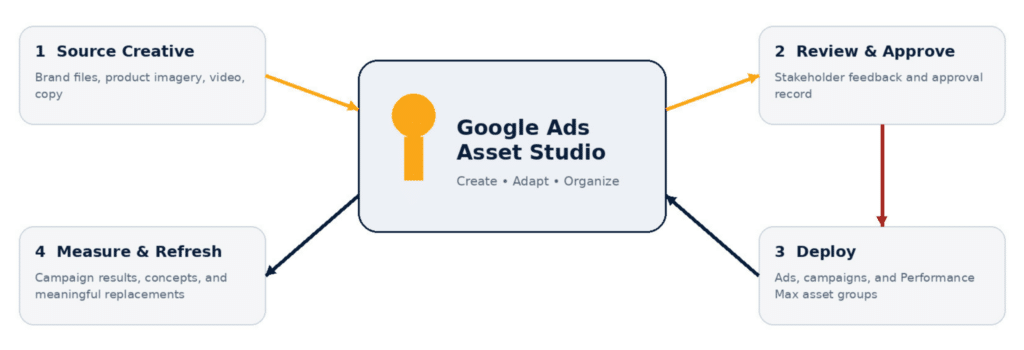
Google Ads Asset Studio gives advertisers a much more practical place to create, organize, edit, and review creative without bouncing between separate tools. The real value is not that it replaces creative strategy. It helps turn a solid, approved concept into the image, video, and format variations a campaign actually needs.
Key Takeaways
- Asset Studio is Google Ads’ workspace for creating, adapting, organizing, previewing, and sharing creative assets.
- The Asset Library is account-specific. It is not a single MCC-wide library shared across every client account.
- Image and video tools can speed up production, but access varies by account and feature.
- Asset-level reporting is useful for context, but many metrics are non-summable and should not be treated as proof of performance.
- Human review, external master files, documented approvals, and campaign-level measurement are still essential.
- Several more advanced brief-to-ad and testing features were announced for summer 2026 and may not yet appear in every account.
What Is Google Ads Asset Studio?
Google presents Asset Studio as a centralized destination for creating, editing, managing, previewing, and sharing assets. Its official overview covers the Asset Library, import workflows, image tools, video tools, voiceover, and shareable previews.

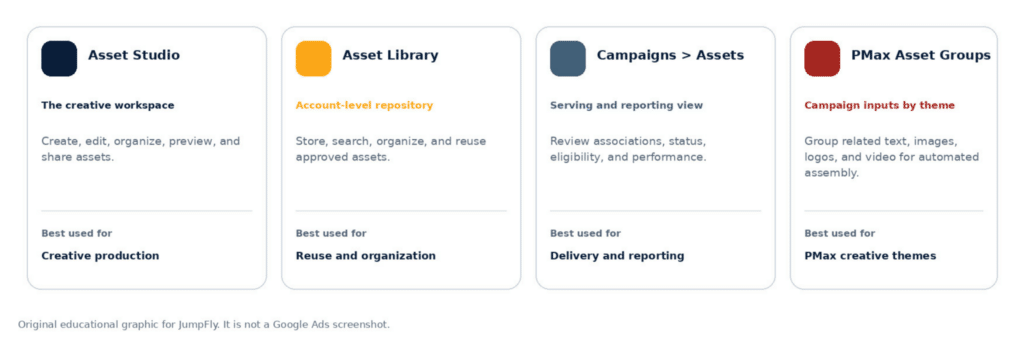
This is where people can get tripped up: Asset Studio, the Asset Library, the Assets page, and Performance Max asset groups are related, but they are not interchangeable. Mixing them creates confusion about where creative is stored, attached, and measured.
| Area | Primary role | What it is not |
| Asset Studio | The overall workspace for creating, editing, organizing, previewing, and sharing creative. | A replacement for campaign setup, reporting, or experiments. |
| Asset Library | The account-level repository for storing, finding, organizing, and reusing assets. | An MCC-wide library shared across client accounts. |
| Campaigns > Assets | The main area for reviewing asset associations, eligibility, status, and performance. | The primary creative-production workspace. |
| Performance Max asset groups | Themed collections of text, images, logos, videos, and other inputs that Google combines into ads. | General storage folders or fixed ads with one locked layout. |
Asset Studio should not be confused with Ads Creative Studio, a separate product that Google discontinued. Asset Studio is built directly into Google Ads.
What Can You Do in Google Ads Asset Studio?
The account-level library can also pull files from sources such as Google Drive and Dropbox. For agencies, that account-level boundary matters. A strong naming convention is still necessary because you’ll need to be able to search the images in the library. It’s one thing when you have only a few images, but when you start getting into the hundreds or thousands, you need to be able to search quickly.
If you are a retailer, I also advise you to name the images for what the product is (for example, the make and model). That way, if you need a model-specific image, you can find it, or if you discontinue the item, you can easily filter and delete the images to make sure you don’t use them accidentally.
In eligible accounts, image tools can generate creative from prompts, follow a reference image, or place a product into a lifestyle setting. Existing images can be cropped into landscape, square, and portrait formats, while the editor can replace backgrounds, add or remove objects, and expand borders through natural-language instructions.
For most advertisers, adapting good existing creative will be more useful than generating something from scratch. A home-services advertiser may have one strong technician photo but no usable portrait crop. An ecommerce advertiser may need a lifestyle version and several ratios from one approved product image.
For larger libraries, Google documents the ability to apply the same instruction to as many as 100 images, review failures, regenerate outputs, and save approved versions without changing the originals.
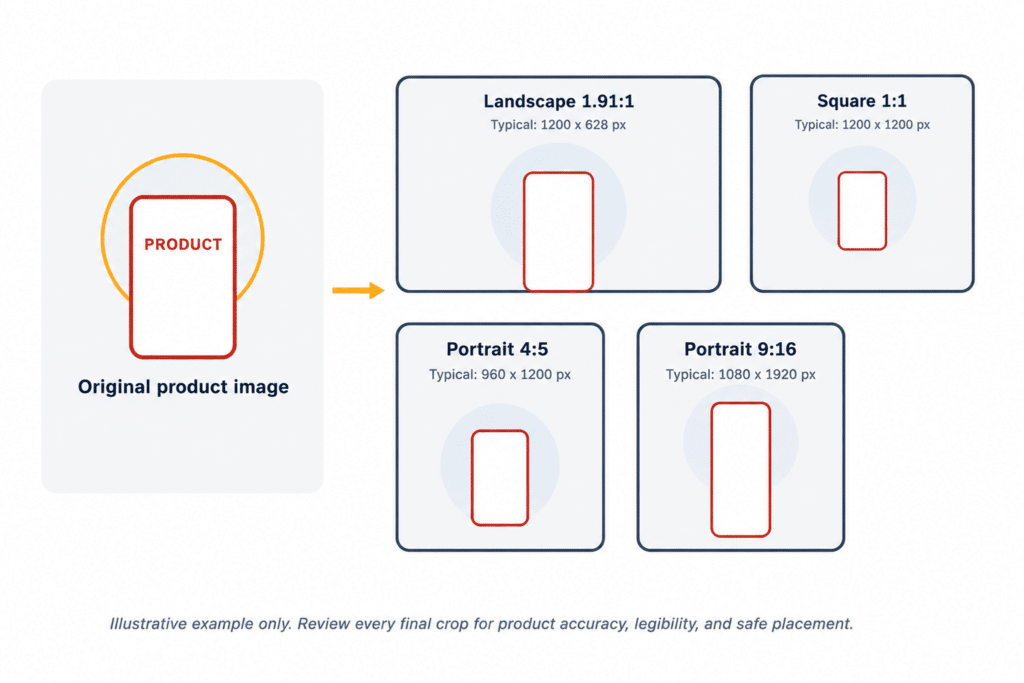
Each aspect ratio is designed for different inventory. Landscape 1.91:1 (1200 × 628) and square 1:1 (1200 × 1200) provide broad coverage across Performance Max and Demand Gen, while portrait 4:5 (960 × 1200) is better suited to taller, mobile-first placements. Demand Gen also supports 9:16 (1080 × 1920), which Google specifically recommends for YouTube Shorts.
Asset Studio’s Video Tools Serve Different Jobs
- Video Builder creates a template-based video from images, logos, text, brand colors, fonts, music, and a storyboard.
- Trim Video turns an existing longer video into shorter ad-ready versions, including common six-, 10-, and 15-second lengths.
- Voiceover adds AI-generated narration to an existing video or supports the creation of an audio-led ad.
- Image-to-Animation creates a separate, silent four-second animated clip from a static image. It can serve in eligible Performance Max placements or become an ingredient in Video Builder.
These tools are most useful when they are matched to the job at hand: building a new ad from existing assets, shortening a longer video, adding narration, or giving a static image motion. Rather than treating them as interchangeable, use the tool that gets the approved creative into the format the campaign actually needs.
Asset Studio may also surface suggested assets for eligible Performance Max campaigns. Teams can share representative previews externally. According to Google’s preview documentation, links last 14 days and show possible appearances, not every combination or a guaranteed final ad.
How To Use Asset Studio: A Practical Workflow
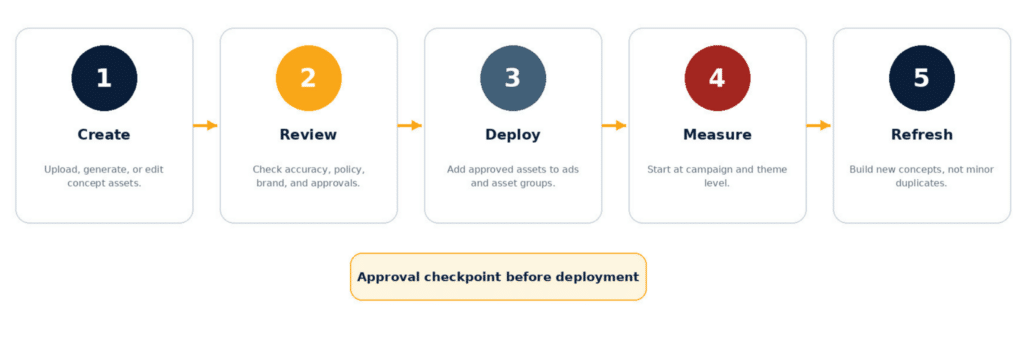
Google Ads labels and menus will keep changing. The basic process should not. This is the workflow I would recommend for most advertisers and agencies:
1. Review the existing library, and then create folders and a naming system that connect each asset to a campaign concept or product category
2. Start with the strongest approved photography, product files, logos, and video rather than using AI as a substitute for good source material.
3. Build around a defined concept or hypothesis, and then adapt it into the required formats and aspect ratios.
4. Review every output at full size for accuracy, branding, policy risk, visual quality, and awkward crops.
5. Separate approved assets from drafts and record formal stakeholder approval outside Google Ads.
6. Load approved assets to the appropriate folder in Asset Library.
7. Add assets to the appropriate ads, campaigns, or asset groups and confirm retired creative is no longer associated elsewhere.
8. Measure performance at the campaign, asset group, channel, and concept levels before relying on an individual asset row.
9. Return to Asset Studio for meaningful replacements or genuinely new ideas, not endless minor variations.
Important Limitations
Asset Studio centralizes production but not the entire asset lifecycle. The library belongs to one Google Ads account, not the manager account above it. Keep original files, editable designs, brand guidelines, usage rights, and approval records outside Google Ads.
AI access also varies. Google’s generated-image requirements explain that manually prompted generation can depend on account age, policy history, sensitive verticals, election-advertising verification, supported language, and rollout status. A newer or otherwise ineligible account may still see automatically suggested images even when it cannot type its own prompts.
Every generated or edited image still needs a manual review. AI can create convincing mistakes in products, packaging, text, logos, people, tools, vehicles, lighting, and claims. A polished contractor image is not usable if it changes the logo or implies a service the business does not provide.
Performance Max brand guidelines can steer eligible formats with colors, fonts, business names, and logos. Treat those settings as guidance, not universal brand enforcement, and continue reviewing the actual assets and previews.
Google applies SynthID watermarking and other provenance mechanisms to images generated or edited with Google AI. It is also gradually rolling out AI-label settings across its advertising products during July 2026. Those platform controls can help, but they do not replace the advertiser’s responsibility to review applicable disclosure requirements. Keep an internal record of where AI was used and confirm whether a label or disclosure is required. Platform controls alone do not guarantee compliance.
How To Measure Asset Performance Correctly
Asset reporting is useful, but the most common mistake is treating each row as an isolated ad test.
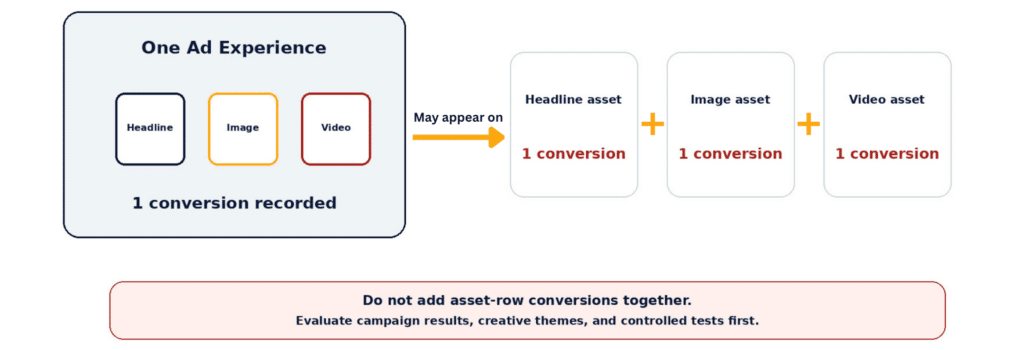
Asset-level impressions, clicks, costs, conversions, and conversion value can be non-summable. When one ad impression contains several assets, each asset may register it. Adding asset rows can therefore produce totals that do not match the campaign or asset group.
Asset-level CTR, CPC, CPA, and ROAS are directional for the same reason. A headline serves with other text, images, videos, products, audiences, placements, and settings. Google’s asset-level metrics guide cautions advertisers about both non-summable totals and directional ratios.
I would not pause an image simply because it shows a weaker asset-level CPA. First, check its delivery, serving context, and the performance of the campaign or asset group. The row is a clue, not a controlled experiment.
I recommend evaluating creative in this order:
1. Overall campaign results
2. Asset-group or creative-theme performance
3. Channel or network performance
4. Top combinations and serving context
5. Individual asset delivery and directional metrics
6. Controlled experiment results
An asset with zero conversions may have received little delivery. Before removing it, review impressions, spend, time active, and serving context. Apply the same caution to an asset that looks unusually strong after only a few interactions.
Ad Strength measures creative completeness, relevance, and variety. It can help identify missing formats or repetitive inputs, but it does not prove that a campaign will achieve its CPA or ROAS target.
Google Ads Asset Studio Best Practices
Use consistent folders and naming conventions, but keep master files outside Google Ads. Organize assets by the creative idea they represent, such as a product-focused image, lifestyle image, promotional message, or specific customer benefit. This makes it easier to compare which types of creative are performing best.
More assets do not automatically create a better test. The variations need to represent different creative ideas. Prioritize meaningfully different ideas, such as:
- Product-led versus lifestyle-led
- Benefit-led versus problem-led
- Promotional versus evergreen
- Brand-focused versus direct response
- Premium positioning versus value positioning
The goal is to test noticeably different creative approaches, not just small cosmetic changes. When each variation represents a distinct message, visual style, or selling point, the results can provide clearer direction about what your audience responds to and what should influence the next round of creative.
Changing a background from light gray to pale blue may create another file, but not a meaningful new idea. A product demonstration, customer-use scenario, or benefit-led graphic is more likely to reveal something useful.
Review every AI output for accuracy, brand consistency, text, people, objects, packaging, and unsupported claims. Check each aspect ratio separately because a strong square image can still become an awkward portrait crop.
Maintain an AI-use and approval record with the source, reviewer, date, usage rights, and disclosure status. Remove retired creative from every serving association, and especially the library.
What’s New and Rolling Out in 2026?
Google announced in May 2026 a brief-to-ad workflow that can use a marketing brief, brand guidelines, website content, and campaign goals to develop coordinated creative themes and asset types, followed by natural-language refinement.
Google also announced upcoming Gemini Omni video capabilities and 1-Click A/B Testing. In its May 20, 2026 product announcement, Google said these features would roll out globally in English during summer 2026.
That wording matters. These are announced or rolling-out capabilities, not features that every advertiser should expect to find today. Availability may differ by account, language, market, campaign type, and rollout stage.
Asset Studio Works Best When the Strategy Comes First
Asset Studio is most useful when the account already has a clear creative direction, and someone is making intentional decisions about what to test. It can turn one approved idea into more usable formats, shorten production time, and improve organization.
It is less useful when treated as a button for producing as many variations as possible. More creative does not automatically mean better creative or a cleaner test.
Use Asset Studio for production and adaptation while keeping your paid search strategy, brand review, approvals, and performance decisions with the people managing the account. That is where the tool saves time without replacing the judgment that makes the creative useful.