AI-generated creative is already changing how advertisers approach visual production. With Google’s Gemini platform rolling out deeper integrations across Google Ads, its built-in image generation model, Nano Banana, gives marketers a practical tool for creating scalable, brand-aligned ad visuals quickly and affordably.
Whether you’re an e-commerce brand looking to improve product presentation or a service-based business focused on generating leads, AI-generated imagery can support nearly every stage of your campaign. The key is knowing how to write prompts that get results. This post covers everything you need to know to get started, including prompt structures, use cases, and real examples from campaigns we’ve tested.
What Is Nano Banana and How It Works
Nano Banana is Google’s native image-generation model built into the Gemini AI platform. It’s been integrated directly into tools like Performance Max, the asset library, and Product Studio. You enter a written prompt into Gemini, and Nano Banana renders an image based on your description. You can guide lighting, product placement, image size, setting, and even edit elements after generation. Need to remove the background, change the scene to a holiday setting, or make the lighting warmer? Just ask.
Be creative, think outside of the box, and embody your inner graphics designer/photographer. The more descriptive you are in defining what you want, the better the system works in recreating your prompts.

Because it’s built for marketers, Nano Banana also supports ad-safe formatting and understands basic design intent, like how to frame a product or keep the brand’s color palette intact.
Nano Banana access is available through two main Gemini tiers (Gemini is integrated into Google Workspace for most business, enterprise, and education plans):
- Free Tier: Good for basic testing and prompt experimentation, but image generation may be limited or unavailable depending on your region.
- Gemini Advanced ($19.99/month): Includes full access to Nano Banana Pro, supports high-resolution outputs, and is best suited for businesses creating visuals regularly.
For consistent use, marketing teams should opt for the Gemini Advanced plan. Product Studio access within Google Ads is still rolling out and may offer limited Nano Banana functionality depending on your account setup.
Why Marketers Should Care About Nano Banana
Nano Banana isn’t just a shortcut to get more visuals. It’s a way to remove creative bottlenecks entirely. Case studies from early adopters show a 20% lift in click-through rates and a 15% decrease in cost-per-lead, demonstrating the tangible impact on marketing efficiency. Here are a few of the ways brands are already using it:
- For E-commerce Brands: If your current product images are plain white background shots, Nano Banana lets you generate realistic lifestyle backgrounds that make your product stand out. You can transform a generic pack shot into a scene with lighting, environment, and props that align with your brand. Need visuals for your website, a carousel ad, a seasonal promotion, or a last-minute social post? You can create it all in-house with a little patience and the right prompt.
- For Service-Based Businesses and Lead Gen: Don’t have a product? No problem. You can use Nano Banana to illustrate your service visually by showing a technician in action, a friendly team photo, a metaphor like a glowing shield for security, or an outcome like a customer smiling in a freshly cleaned home. This helps you build trust and clarify what you offer, without relying on stock photos or custom shoots.
- For Marketing Teams of Any Size: You don’t need a design background to make great visuals. With the right prompts, anyone can create ad-ready images. You can also edit previous generations or quickly create visual variations for A/B testing or seasonal updates. This saves time, cuts costs, and helps smaller teams scale creative output without hiring or outsourcing.
How to Write Prompts That Work
Think of a Nano Banana prompt like a creative brief. The clearer your instructions, the closer the AI gets to your vision. A good prompt describes what the image should show, how it should look, and what kind of emotion or action it should convey.
A simple structure to follow:
Subject | Action | Setting | Style | Lighting | Mood | Optional Details
Focus on:
- Naming the exact object or subject
- Defining the context (where it is, what it’s doing)
- Choosing a style (photorealistic, editorial, flat lay, etc.)
- Explaining the desired light source and mood
Avoid vague language like “beautiful” or “aesthetic.” Use specific visual cues like “soft shadows,” “shallow depth of field,” “overhead camera angle,” or “sunlight from the left.” The AI takes each part literally.
An important thing to remember is that if you don’t deliberately say “create an image,” make sure to select the Nano Banana “Create Image” button at the bottom of the prompt.
Nano Banana Prompt Strategies for E-commerce
For e-commerce advertising, strong visuals can increase click-through rate, build brand trust, and improve conversion. Here’s how to structure prompts based on campaign type or asset need.
- Studio Product Shots: These work best for Shopping feeds, product listings, or clean performance creative.
- Lifestyle Product Scenes: Great for Performance Max ads, Meta ads, hero banners, or social posts where you’re trying to show the product in use.
- Promotional or Seasonal Assets: Quickly update product visuals with holiday themes or new backdrops.
- Multi-Product or Bundled Creatives: Use one prompt to feature multiple SKUs or cross-sell opportunities.
Real Client Example of a Nano banana Prompt
We’ve had the opportunity to work with amazing brands like Jura, known for their premium coffee machines. For this example, I’m using their GIGA 10 Diamond Black as the featured product.
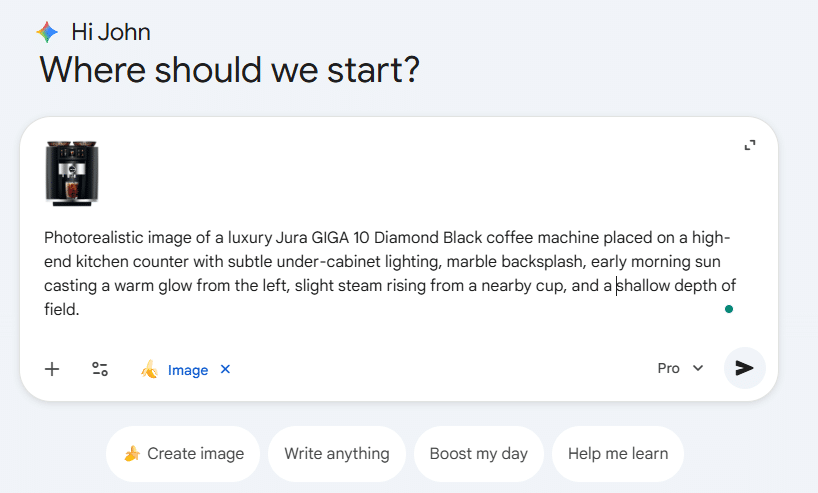
Alongside the prompt below, I’ll also upload Jura’s standard product image – typically a white background studio shot – which helps Nano Banana better understand the product design and preserve accuracy during generation.
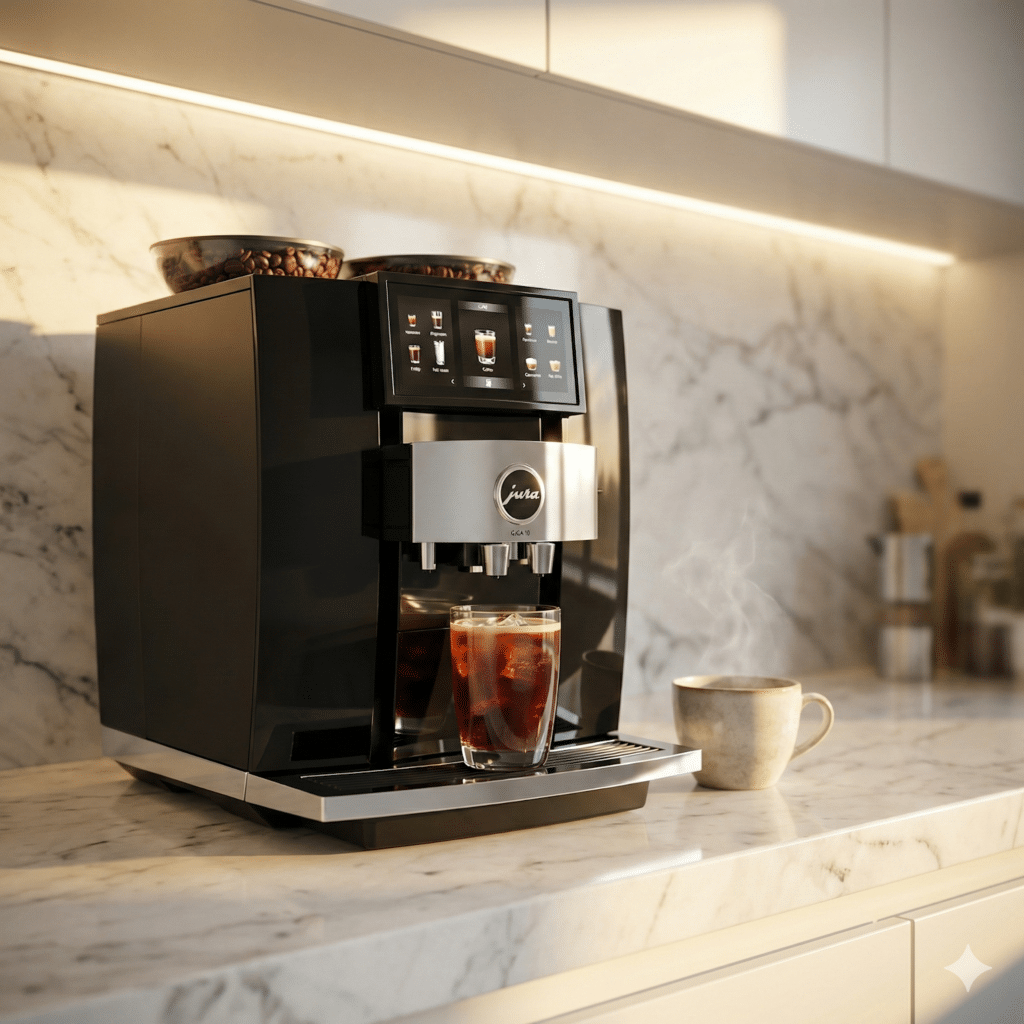
Example Prompt: “Photorealistic image of a luxury Jura GIGA 10 Diamond Black coffee machine placed on a high-end kitchen counter with subtle under-cabinet lighting, marble backsplash, early morning sun casting a warm glow from the left, slight steam rising from a nearby cup, and a shallow depth of field.”
After about 30 seconds, this was the generated image:
Prompt Strategies for Lead Gen and Services
If you’re advertising services, software, or anything intangible, image prompts are about evoking emotion, trust, and clarity.
- Human-Focused Trust Visuals: Show real people helping others, using your service, or smiling post-service. This works well in local and B2B ads.
Example Prompt: “A digital marketing strategist sitting at a desk reviewing a Google Ads dashboard on a dual-monitor setup, natural lighting from a nearby window, JumpFly branding subtly on a notebook or mug, clean and modern workspace, focused and confident expression.”

This prompt promotes JumpFly’s Google Ads management services by visually showing the kind of dedicated, data-driven attention a client’s account receives.
- Outcome-Driven Prompts: Display the end result: clean homes, happy clients, streamlined dashboards, or completed work.
Example Prompt: “A Google Ads dashboard showing rising performance graphs on a laptop screen in a bright workspace, with a happy business owner in the background giving a thumbs-up, brand colors softly integrated in the environment.”

- Conceptual Metaphors: For services that are harder to visualize, like data protection or consulting, use metaphors. Shields, bridges, puzzle pieces, and clean paths all communicate value without showing the service directly.
Example Prompt: “A stylized scene of a clean, futuristic workspace where data streams shaped like light trails converge into a glowing, upward-pointing arrow. The arrow is composed of digital elements like search bars, ad charts, and KPI icons, symbolizing campaign growth. Soft gradients of JumpFly blue subtly frame the path, giving the sense of organized momentum and professional clarity.”

How to Scale and Test Efficiently
Once you have a few base prompts that work, you can iterate quickly by changing key variables: the setting, lighting, background, or color treatment.
Save winning prompts. Build a small library of structured formats that align with your campaigns: promos, product launches, testimonials, seasonal refreshes, and remarketing.
You can also test multiple versions side by side. Try a clean product image against a lifestyle one. Add human faces to one version, and remove them from another. Nano Banana gives you the power to test creativity at scale with minimal effort.
Final Takeaways and Things to Remember
Writing effective image prompts takes some trial and error, but it’s already proving to be a valuable skill for modern marketers. Whether you need a clean product photo, a relatable lifestyle visual, or something more conceptual for lead generation, Gemini and Nano Banana give you a flexible way to create those assets quickly.
Start by understanding the structure, test different variations, and fine-tune as you go. With a little creativity and a clear idea of what you want to express, anyone on your team can use this tool to generate visual content that drives results.