

Creative testing is an important part of advertising, but it’s easily overlooked in Google Ads. When managing Google Ads campaigns, it’s easy to spend most of your time looking at bids, budgets, keywords, and targeting while letting creative fall through the cracks.
AI can make it easier to run more creative tests within your campaigns. Instead of spending hours developing new messaging or creating every asset from scratch, advertisers can use AI to explore ideas and produce more variations to test.
Traditionally, creative testing looked like the following process:
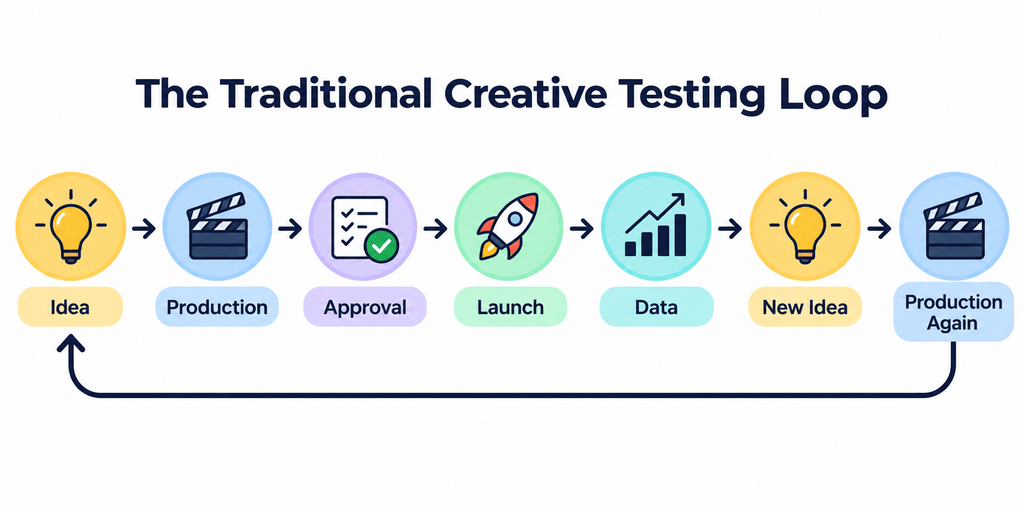
Now, by leveraging AI tools, this process can be simplified to the following, without having to go through an intensive production process:

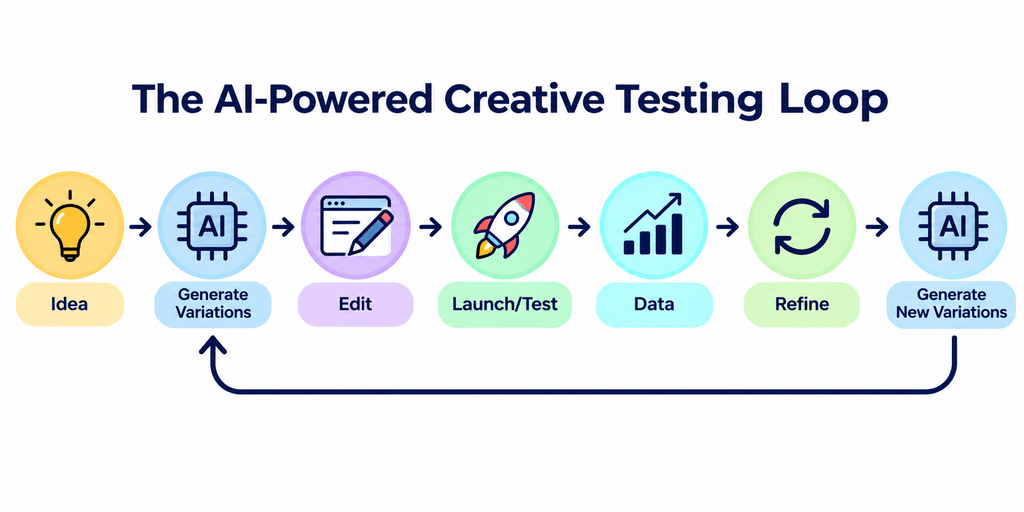
What Does It Mean To Scale Creative Testing With AI?
Scaling creative testing isn’t just about creating as many ads as possible. It’s about testing more ideas without having to increase the time and resources you put into each one.
For example, an advertiser might have a few videos and images that perform well, but they may not know which parts of those ads are actually driving results. Is it the messaging? The offer? The imagery? Or a combination of all three?
Testing different approaches can help answer those questions. The challenge is that developing new concepts and producing the assets to go with them takes time, especially when you do not have an entire creative team.
This is where AI can be useful. It can help advertisers brainstorm new angles, create alternative versions of existing assets, and adapt creative for different placements. It provides multiple options more quickly, which allows advertisers to determine the best strategies for reaching their target audience.
How AI Can Help Advertisers Create More Creative Variations
A. Generate different messaging angles
Utilizing AI tools, you can brainstorm different messaging angles in the creative that might better resonate with your target audience. These ideas help provide a starting point for ways to test the creative being used in your campaigns, whether that be through your videos or images.
B. Create alternative images
Instead of relying on one specific style of image, you can leverage AI to produce different styles of images to see what works with your target audience.
C. Produce additional video concepts
Video often takes more time to produce than static creative, which makes testing different ideas hard. AI tools like Veo and Google Vids have been helpful in generating different variations of videos to determine what messaging or visuals might resonate more with an audience.
D. Adapt creative for different formats
Google Ads often has a multitude of different video and image sizing requirements depending on the campaign you are running. AI tools have been helpful in reformatting these assets, whereas before, they could have taken a lot longer to get done.
Start With a Clear Creative Testing Strategy
Before testing new creative, decide what you want to compare. This could include:
- Hooks: What grabs attention?
- Messaging: What product benefit are you highlighting?
- Offers: What incentive are you promoting?
- Visuals: What images or videos are you using?
- Format: Are you testing horizontal, square, or vertical assets?
- CTA: What action are you asking users to take?
Instead of testing everything at once, focus on a few key differences so you can more easily understand your creative’s performance data.
For example, an advertiser is trying to get sales for a lunch box. They could create three different creative concepts: one focused on keeping food fresh, another on making packed lunches easier, and a third on the product’s design.
Instead of creating each video from scratch, the advertiser could use AI to turn existing assets into three different video variations, each highlighting a different benefit. This saves time on production and makes it easier to test multiple creative ideas.
The results can then inform the next round of creative. If the convenience-focused message performs well, the advertiser could explore more variations around that benefit rather than moving on to an entirely unrelated idea.
4 Things To Keep in Mind When Running Creative Tests
- Creative variations need to have a clear objective.
- Don’t change too many things at once; otherwise, it will be hard to determine your results.
- Don’t publish AI-generated assets without thorough review. (And if you use people in the video, make sure to update the setting in Google Ads per state laws.)
- Allow enough time and data to evaluate performance after launching creative variations to see what is most effective.
AI Can Scale Creative Testing, but Learning from Data Makes the Difference
AI can help advertisers save time when creating and testing new ad variations. From generating different messaging ideas to adapting existing assets, it makes it easier to explore more creative options.
However, creating more ads doesn’t guarantee better results. Having a clear testing strategy and using performance data to guide future creative is what makes the process effective. AI can help speed things up, but knowing what to test and learning from the results is what matters most.