

The digital advertising landscape is shifting once again, and if you’ve been relying on the Google Display Network to find new customers, it’s now time to upgrade your strategy. Google is officially transitioning Display campaigns into Demand Gen.
This AI-powered campaign type is designed to capture consumer attention across Google’s most immersive, visual touchpoints like YouTube, Shorts, Discover, and Gmail. While change can sometimes feel disruptive, this evolution actually provides a meaningful opportunity; Demand Gen moves beyond passive banner ads to deliver high-impact, lookalike-targeted creatives that can help drive actual conversions rather than just impressions.
Why Google Is Making the Switch
The internet and consumer habits are constantly evolving. People no longer just browse static web pages. They now spend hours watching video feeds and scrolling through personalized content.
Demand Gen uses advanced artificial intelligence (AI) to find potential customers before they even search for your product. It moves your brand from a simple background banner to the center of an interactive user experience.

Transition Timeline and Key Dates
- June 2026: Google rolled out a migration tool inside Google Ads accounts for eligible advertisers to manually move active campaigns.
- January 2027: Advertisers will no longer be able to create new standalone Display campaigns.
- Later in 2027: Remaining active Display campaigns will be automatically migrated to Demand Gen by Google.
Key Benefits of Demand Gen
- Better Placement Opportunities: Your ads can now appear inside YouTube Shorts, standard YouTube feeds, Google Discover, and Maps, as well as the Google Display Network and Gmail.
- Lookalike Segments: You can upload your high-value customer data in order to find new people who share the exact same habits and interests.
- Immersive Formats: You can mix high-resolution images and video carousels in a single campaign.
- Smart Bidding: The system algorithms can automatically optimize your budget to drive clicks, leads, and website visits.
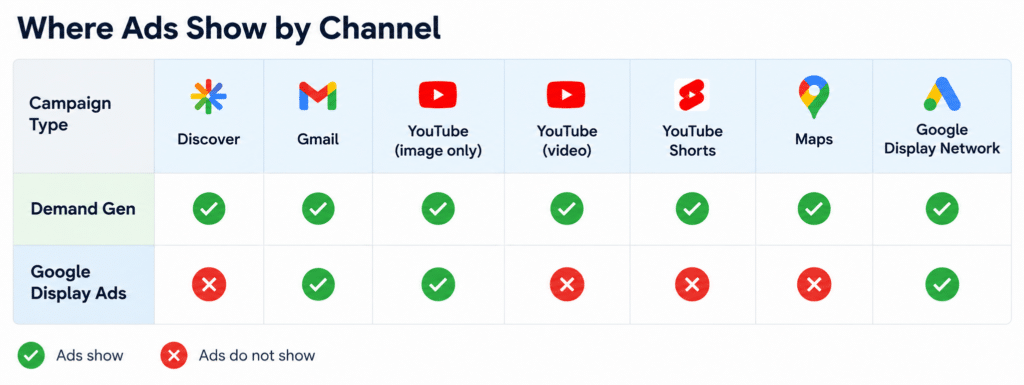
Campaigns migrating to Demand Gen retain many of the settings you’re already familiar with, but also benefit from additional features along with the ability to optimize performance across expanded dimensions. Here are some of the key features you’ll gain by updating to Demand Gen.
Inventory
- You can expand your reach beyond solely the Google Display Network by leveraging channel controls to access a more diverse inventory across platforms like Google Discover, Maps, Gmail, and YouTube.
Creatives
- More formats: You will be able to upload a greater array of video ads on Demand Gen.
Campaign settings
- Lookalike targeting: Similar Audiences are now evolving into Lookalike segments, allowing you to reach valuable new, qualified audiences who share characteristics with your existing customers.
Reporting
- Format segmentation reporting: You’ll gain transparency into insights broken out by format level, including In-Feed, Skippable In-Stream, and Shorts.
Google Ads Demand Gen Migration Tool
This tool allows you to update live campaigns with performance history (dating back to 42 days) ported over with the migration. This minimizes learning time to approximately one to two days and avoids a “cold start” typically associated with resets.
Note: Migrated Google Display Ads campaigns will have Google Display Network opted in by default, and you will not be able to unselect it during migration. You can add other channels (like YouTube and Gmail) after migration is complete.
- Go to Campaigns within the Campaigns menu.
- Select the filter button above the “Campaigns” table, and then open the Attributes dropdown.
- Select Campaign type, choose the box next to “Display,” and select Apply.
- Choose the box next to each campaign you’re choosing to migrate.
- Open the Edit dropdown, then select Upgrade to Demand Gen.
- You’ll find an alert telling you the following:
- Settings and learning are transferred to the new campaign.
- Your budget will be transferred, but campaign spend on the same day of migration will not be taken into account.
- You’ll find an alert telling you the following:
- Select Apply.
- Note: The migration may take a few minutes.
- You can migrate multiple campaigns at the same time; however, migrating more than 100 campaigns in a single batch isn’t recommended.
Maintain Your Competitive Advantage
This shift from standard Display Network to Demand Gen campaigns is a major step forward. Transitioning early can help your business reach potential consumers where they’re spending time today. Update your creative paid search strategy now to stay ahead of competitors and create more opportunities to win new customers.