
Ah, spring. The time of year when the trees are turning green, the magnolia trees are blooming, and bad actors are turning to thoughts of hacking, and not the kind brought on by seasonal allergies or a spring cold.
It feels like every month, there is a new phishing ploy. We’ve been getting emails from a JumpFly “employee” named Tim, imploring us to check out those retirement pictures, or the boss needs his credit card information updated immediately. I’ve also blogged in the past about protecting your Google Ads accounts from being hijacked. And our CTO blogged about two-step verification measures that are easily circumvented.
And lately, we’ve identified a highly sophisticated phishing campaign currently targeting Microsoft advertising accounts. This isn’t your standard “Nigerian Prince” or “Tim” email, but one that uses legitimate delivery services and hyper-personalized lures to bypass traditional security filters.
We’ve already seen several accounts targeted. Below is what you need to know to protect your business.

The Scam
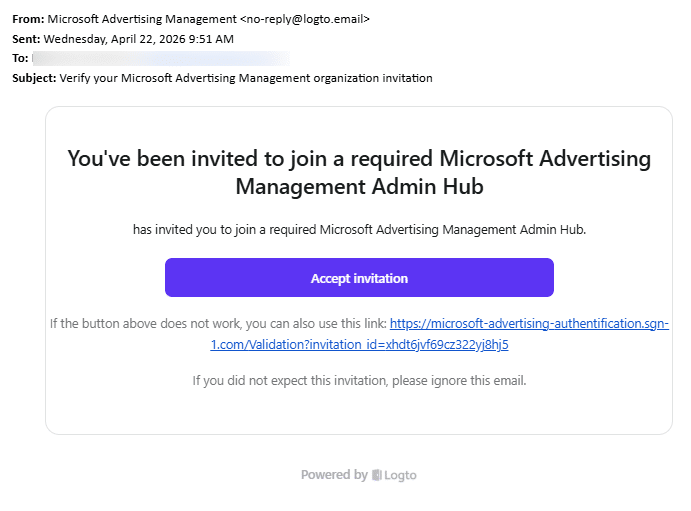
The attackers are sending emails that look like official invitations to join a “Microsoft Advertising Management Admin Hub.”
How to spot the fake:
- The “From” Address: In this current wave, the emails are coming from [email protected]. Logto is a real service, but hackers are using it to send “clean” emails that don’t get flagged as spam.
- The Malicious Link: If this were an email sent to you, and you were to hover your mouse over the Accept invitation, you’d see the link contains sng-1.com; you can also see it displayed below the Accept Button, where it says if the button doesn’t work. While it has ‘microsoft’ in the URL, it’s not coming from microsoft.com. Microsoft will always use a microsoft.com domain. Basically, it’s a trap.
- Who Invited You? You’ll notice it’s missing WHO invited you. It just leaves it ambiguously blank: “…has invited you to join a required Microsoft Advertising Management Hub.”
- The Fake Urgency: The email uses the word “required” to pressure you into clicking before you think. (And the soft sell: “If you didn’t expect this invitation, please ignore this email.”)
What Do the Hackers Get?
Just like when Google Ads accounts are hacked, Microsoft Ad accounts can get hacked in order to use the accounts to create new campaigns that spend your money to send ad traffic. Two of our clients have been hacked; one account had the owner’s email removed from the account, and new campaigns were made until they were caught. The other had their email suspended, which then suspended their account. That client is currently trying to recover their email and get their account unsuspended.
Oops, I Clicked the Link. Now What?
If you or a team member clicked the link or entered credentials, don’t panic. But act immediately. This attack often uses “Device Code Phishing,” which manipulates you into completing a login on a real Microsoft page, handing the attacker a valid Multi-Factor Authentication (MFA) in the process.
Step 1: Change Your Password
Change it, change it now.
Step 2: Force a Global Sign-Out
Changing your password is not enough (see Step 1 and go back and do it if you didn’t). You must revoke the “tokens” the hacker stole.
- For Admins: Go to the Microsoft Entra (Azure AD) or M365 Admin Center, find the user, and select “Sign out of all sessions.”
- For Users: Go to your Microsoft Account Security Dashboard and choose to sign out everywhere. (Note: this can take up to 24 hours to fully take effect; make sure you don’t skip step 1.)
Step 3: Audit “Enterprise Applications” (for Admins)
These hackers often “plant a bug” by granting a fake app permission to read your data.
- Go to Azure Portal > Enterprise Applications.
- Look for any newly added apps you don’t recognize (e.g., “Microsoft Advertising Hub” or “Validation App”) and Delete/Revoke them.
Step 4: Check Outlook Rules
Hackers frequently set up hidden rules to forward your emails to them.
- Check your Outlook settings for any rules that “Forward to” or “Move to Folder” for external addresses you don’t recognize.
Step 4: Scan for Malware
Better to be safe than sorry. While many of these are “credential-only” attacks, some can trigger silent downloads. Run a full system scan using a reputable security suite.
Protect Your Accounts from Hackers and Hijackers
Phishing attacks are evolving faster than most businesses’ defenses. This newest attack is a reminder that today’s threats don’t arrive with broken English and outlandish promises. They arrive in polished and personalized emails using legitimate infrastructure. They are designed to make you comfortable enough to act before you think. The best protection is a combination of vigilance and process; slow down before clicking any invite you didn’t expect, verify access requests through a separate channel, and make sure your team knows these red flags.
If you manage Microsoft Advertising accounts and aren’t sure whether your access controls are up to date, now is the time to audit them. And as always, if something feels off, it probably is; trust that instinct.