

Google Merchant Center has expanded beyond basic product feed management to include built-in analytics that help merchants better understand how their products perform across Google surfaces, including Shopping ads and free listings.
The Analytics section provides insights into product visibility, pricing competitiveness, and shopper behavior on your website. Instead of relying only on Google Ads reporting, merchants can use these reports to understand how their product catalog, pricing strategy, and website experience influence performance.
Within the Analytics menu, there are four main reports (though some accounts might have a Custom Reports section as well):
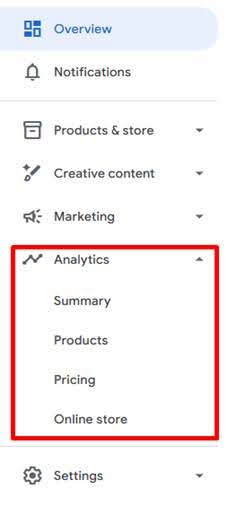
Each report focuses on a different stage of the shopping journey and can help uncover opportunities for optimization.

Summary Report
The Summary report provides a quick overview of how your products are performing across Google.
Two of the most useful metrics here are Product clicks and Online store clicks.
- Product clicks (Ads + Organic) show the total number of clicks your product listings received from both paid Shopping ads and free listings. This metric gives a broad view of how often shoppers are engaging with your products across Google.
- Online store clicks (Organic) represent clicks coming specifically from free product listings, without any ad spend behind them.
Looking at these metrics together can help identify shifts in traffic sources. For example, if product clicks are declining but organic clicks are increasing, it may mean your free listings are gaining visibility while paid traffic is decreasing.
The percentage change shown under each metric reflects how performance compares to the previous reporting period.
Products Report
The Products report focuses on how individual products and product groups are performing. This is often the most actionable report because it shows performance at the product level rather than just at the campaign level.
Within this section, merchants can identify:
- Top-performing products
- Items gaining or losing visibility
- Products receiving impressions but few clicks
If you want to explore performance more deeply, Merchant Center also provides an Analyze performance feature within this report. This tool allows advertisers to review detailed metrics tied to their product listings, helping connect Merchant Center data with performance insights.
Analyze performance is available on all reports throughout the analytics sections. Google has a disclaimer that Google AI is still learning and may show inaccurate results. I’m confident this functionality will continue to improve, but make sure you verify the analysis. I have found this to be a helpful tool in providing additional insights.

Pricing Report
The Pricing report shows how your product prices stack up against similar items being sold across the market. It gives merchants a clearer picture of whether their pricing is competitive compared to other sellers.
When products are priced much higher than similar options, they can have a harder time getting clicks or conversions. On the other hand, products priced more competitively tend to see better engagement.
This report can be useful when reviewing pricing strategies, planning promotions, or making merchandising decisions.
Online Store Report
The Online Store report looks at what shoppers do after they click a product listing and arrive on your site. It gives a better sense of how visitors interact with your product pages, including whether they browse, add items to their cart, or complete a purchase.
Reviewing this data can help highlight potential issues with the onsite experience. For instance, if products receive a lot of clicks but very few purchases, it may point to problems such as slow page load times, unclear product details, or other friction in the buying process.
Analytics in Google Merchant Center
The Analytics section in Google Merchant Center offers additional insights that go beyond standard campaign reporting. It helps merchants better understand how their products perform across pricing, feeds, and the overall shopping experience.
This information can be useful when making decisions about feed improvements, pricing adjustments, or website updates. Alongside GA4 and Google Ads reporting, the Merchant Center analytics section serves as another reliable data source for evaluating performance and identifying opportunities to improve results.