

There’s a temptation when it comes to crafting location pages to aim for the low-hanging fruit: Localized search terms (“service type” + “location”) tossed onto boilerplate landing pages.
Plenty of websites copy information listed on a primary landing page and paste it onto numerous location pages, altering little more than the primary search term and a few lines of copy to incorporate the location name.
Competitors see this tactic, assume it works, and what started as a lazy approach to target localized search rankings becomes a duplicative tactic that yields few results.
And why should it? Adding “naperville” to “hvac services” doesn’t demonstrate that a business is actually relevant for that location — anyone anywhere can do that. To truly “be” local is so much more than appending a city or regional name to a primary search term.

What Does a Location Page Need to Be Local?
There are some fundamental details, such as name, address, and phone number (NAP), services offered in that location, hours of operation, and an embeddable Google Map, that provide context and information to consumers.
Along with those fundamentals, each new page, location or otherwise, needs to justify itself with unique content and details not found on any other page. Said another way, location pages, like any other page on a website, need valuable information that appeals to local users, as well as Google’s desire for E-E-A-T (Experience, Expertise, Authoritativeness, and Trustworthiness).
For location pages, being local means first-hand, community-based content that is authentic and not carbon-copied from another page.
Start with Local Keyword Research
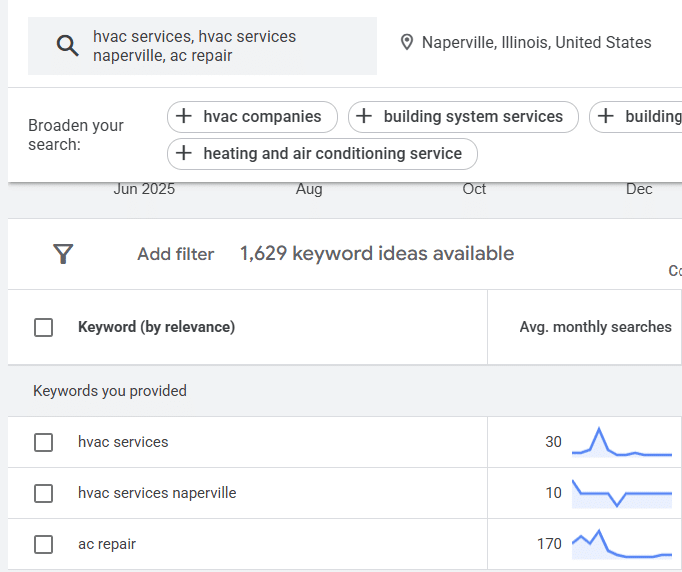
To achieve a location page that hits the mark, one should always start with keyword research, finding keywords with localized search volume. Aim for “service” and “service” + “location” terms that show search volume for the targeted community in Google Keyword Planner, as shown below. Be sure to avoid optimizing for “near me” search terms.
The Fundamentals
Near the top of every location page, it’s important to include all of the details residents and community members in your target location will need. This means both services and products offered, as well as all of the different ways users can find and/or contact you. After a short blurb or visual element detailing your services or industry, include the following:
- NAP data plus email address and any additional methods to contact your business;
- An embedded Google Map that shows your location;
- Hours of operation;
- Photos that show the street view of your business, as well as a few striking photos from inside;
- Highlight features that only this location has to help make this page stand out from the others.
These are the basics, but businesses can and should always go one step further where appropriate. To really embed a business within the community, include information about key team members at that location. This helps to make a business feel personal, local, approachable, and distinct from the competition, as well as getting the ball rolling to build relationships with potential customers.
Consider including the first name of long-term employees or managers, along with a photo and a brief bio that includes how long they’ve worked in the industry, their favorite elements of the business or industry, and post-work hobbies or interests.
Does one of your middle managers enjoy a particular restaurant in the community, or is there a favorite employee who likes taking nature walks at a nearby recreational area? Adding a line or two about these details can help solidify that community element and feed Google’s desire for unique, localized content.
Connect with the Community
With every location page, it’s important to include a few details about the community. This doesn’t need to be longer than a paragraph, but it should speak about the town, neighborhood, or area of the city a business is located within, as well as any relevant details about major cross-streets or nearby highways. If your business is located in Downtown Chicago, for example, this is an essential detail to note. The same can be said for many of Chicago’s wonderful neighborhoods, as residents will surely know that there are important differences between Hyde Park and Avondale.
A great way to capture some localized search traffic and create unique, helpful information is to create a list of distinct FAQs for each individual location page. Ask employees at a particular location for repeat questions customers have, or find ways to use search terms from Google Keyword Planner to answer questions that are important to the area.
The Power of Local Reviews
One of the best elements to add to a location page is a section for reviews from customers who live and work in the area. Try cherry-picking positive reviews where the customer has mentioned a search term or keyword relevant to your business (let’s say “ac repair”), and make sure to include their first name, the review, and their city or neighborhood. If the customer mentioned a detail about your location’s business, even better!
Navigating to Your Location Page
The last detail about a location page is less about the on-page content and more about the structure and taxonomy of where it’s located on your website. When linking to a location page, it should be linked from a location hub page and/or from service landing pages that service the location area. Use relevant, keyword-driven anchor text, such as “HVAC Services in Naperville,” to help both search engines and AI search understand the context and destination of the link.
If a location page can be included in a header navigation, maybe nestled under a location-based header navigation menu, that offers the strongest pipeline of link authority, as it will be linked to from every page on your website. When the page is also optimized with user-friendly, helpful, and unique content, having a link in the header navigation can help increase a location page’s chances of ranking.
Remember, Finding the Right Keywords is Only the Beginning
There are many ways to add distinct and valuable information to a location page beyond peppering boilerplate copy with “service” + “location” keywords. Crafting a page that acts and feels truly local is about meeting your consumers where they are, knowing their journey to and from your business, and communicating exactly how you can help them in their neighborhood.