

Google recently announced that it would be rolling out a new feature for Local Service Ads. It will be another in a recent string of new features that allow advertisers more insights into how their Local Service Ads (LSAs) perform. Historically, LSAs have been much more “black box” than Google Ads, so any updates that allow advertisers more insight into how their dollars are being spent are truly awesome to see.
New Search Intent Segmentation Feature
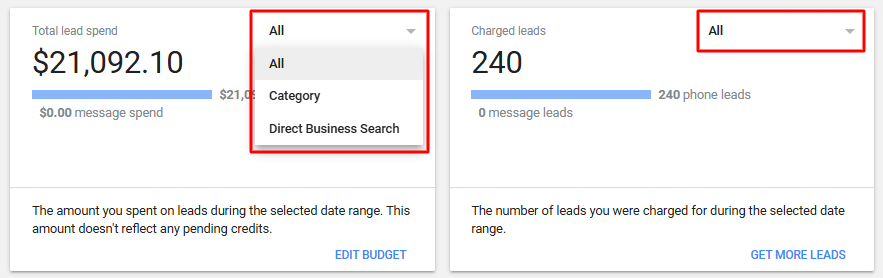
The new feature allows advertisers to segment their lead data and their LSA reports by a customer’s “search intent” to see if the lead came in on a general search (e.g., plumber near me, veterinarian near me, etc.) or a branded search. If the lead came in from a general search, Google defines that as a “Category” lead; if the lead came in from a branded search, Google defines it as a “Direct Business Search” lead.
Where to Find the New Search Intent Toggles
You can find these new toggles in two places within the LSA interface. The first is in the “Leads” section. You’ll see there’s a new dropdown in the navigational bar at the top for “Search Intent.”

The second place you can find these new toggles is in the “Reports” section. You can filter both your total ad spend and your total charged leads based on if the Search Intent was Category or Direct Business Search.

What Is Direct Business Search (DBS)?
The “Direct Business Search” feature, or DBS for short, is a relatively new feature, only being about two years old. This feature is a toggle found within your LSA interface, under the Profile & Budget section. When the DBS feature is switched on, it allows your LSAs to show up when someone searches for your brand or business name directly.
The Brand Defense Debate in Google Ads
Advertisers often wrestle with the idea of advertising on their own brand name in Google Ads. Some view it as a waste of money if they think they can get those same customers organically since they’re already searching for their brand. But if your competition is also advertising on your name, you could lose those customers since your competitor’s ad would show up higher on the page than your organic listing. So playing brand defense can be a cost-effective way for you to ensure you don’t lose out on any customers.
Key Caveats of DBS in Local Service Ads
These same debates surround the efficacy of the DBS feature, but with a few added caveats. The first being that Google Ads utilizes a pay-per-click model, so advertising on your brand name is relatively cheap. You’ll typically pay less than a dollar per click. But with LSAs utilizing a pay-per-lead model, those same leads could go from costing you less than a dollar to upwards of $50 to 100, depending on your vertical.
Google combats this by screening the calls from DBS leads and asking the searcher if they are an existing customer, and if they are an existing customer, you won’t be charged for that lead, so in theory, you only pay for new customers from DBS leads. This works for the most part, but it isn’t 100% foolproof, as I’ve seen firsthand clients be charged for an existing customer, with no recourse to obtain a credit.
Interesting side note: if you are looking at how many DBS leads you got in a given time period in the Leads section of the LSA interface, it will probably be greater than the number of DBS leads you see for that same time period in the Reports section. This is because the Reports section is only showing you the number of DBS leads that you were charged for, whereas the Leads section is showing you all of the DBS leads.
The second caveat about turning on DBS is that LSAs don’t utilize keywords, meaning in theory it’s impossible for a competitor to advertise their LSA on your business name. So turning DBS on in order to play brand defense doesn’t make as much sense when it comes to LSAs.
Why This Update Matters for Advertisers
It’s hard to know exactly what the right answer is when it comes to utilizing Direct Business Search. I’ve found it can vary drastically from case to case. That’s why it’s important that Google is now giving us access to more information – we can let the data tell us.
Having the ability to see how much of your ad spend is going to DBS leads and seeing what percentage of DBS leads you are actually being charged for is going to be a huge help to allow advertisers to make more informed decisions and help them drive the best results possible for their paid Search advertising efforts.