

Today, Google accounts (Gmail, Google Workspace, etc.) are interconnected with so many different services, making the security of any given account more important than ever. Google has always recommended two-factor authentication (2FA) for its accounts, in order to give a secondary factor to prove that you are, in fact, the person logging in to your account.
The emerging issue is that the standard 2FA methods are no longer considered “foolproof.” The standard approach is typically one of two routes to secure your login process:
- A text message with a code delivered to your phone
- A number generated from a third-party authenticator app
Why Are Those 2FA Methods No Longer Preferred?
- Attackers routinely build phishing pages that capture both the password and the one-time code in real time and then replay them immediately on a real Google login page (a “real-time relay” attack).
- Push-based multi-factor authentication (MFA) can be abused by “MFA fatigue” (bombarding the user with prompts until they absent-mindedly tap “Approve”).
- Attackers are now able to bypass a vast amount of spam/phishing protection mechanisms in email services due to the fact that they’re now using legitimate URL relays to “bounce” you to an attack URL. The email services don’t see this as an attack due to the multiple “hops” and redirections that occur once you click a link.
- The filter-bypass aspect of this problem is becoming more and more sophisticated. Attackers are utilizing layers of obfuscated JavaScript code to hide link redirections and multi-layered encryption (this thwarts Google’s phishing/malware detection systems in an increasingly successful way).
The evolution of scam emails can be attributed to a combination of advanced technology and the increasing availability of personal data on the dark web. With AI use and machine learning algorithms, scammers can now automate the creation of phishing emails that are highly personalized and contextually relevant to the recipient. The emails no longer contain the obvious grammatical errors or implausible scenarios that were once telltale signs of a scam.
Here’s an example of a recent phishing attempt that successfully bypassed Google’s own security systems and was intercepted internally:

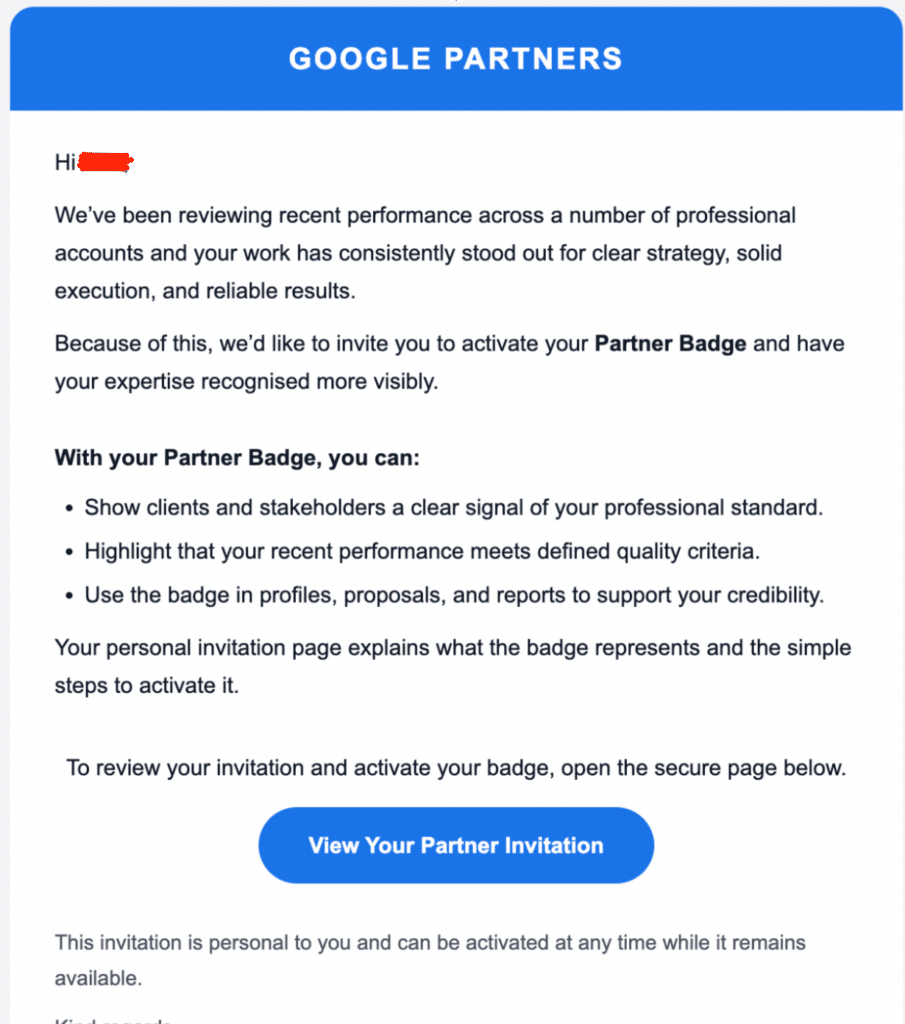
This phishing email pretends to be from Google Partners. If you click the button, it will then request that you “sign in with your Google account,” which relays your username and password directly to the attacker.
The reason these attacks are successful is due to the fact that they appear nearly flawless in their presentation as a legitimate login window, as seen in the screenshot below:
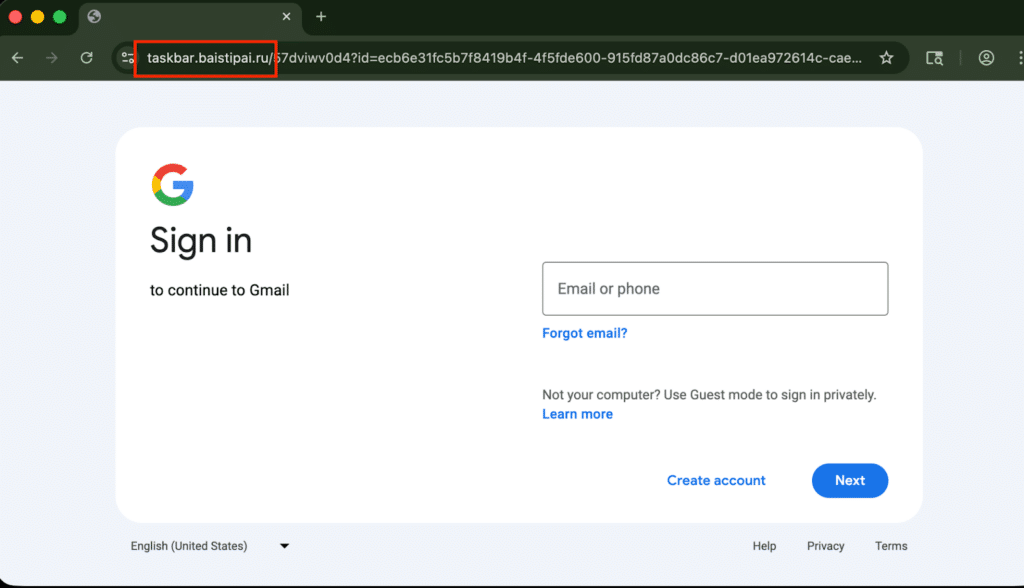
However, if you notice that the URL does not include the required “accounts.google.com” address. This is generally a dead giveaway that a phishing attack is being attempted.
Once the attacker receives your login credentials, they subsequently attempt a legitimate login on your behalf, but from their computer. That will trigger the 2 Factor flow, which might text you a code, or ask you to type in a code from your authenticator app, and once you type in that number, the attacker now has it and can log in as you. Upon a successful login, they can now navigate through each and every connected Google service or any service that you used “Login with Google” for.
Bottom Line: Let’s Get Physical (With a Security Key)
A physical security key replaces the “numerical code” method and binds the login session to the actual browser and physical computer used to log in. These keys effectively remove a hacker’s ability to “relay” your login information from one computer to another and authenticate as you.
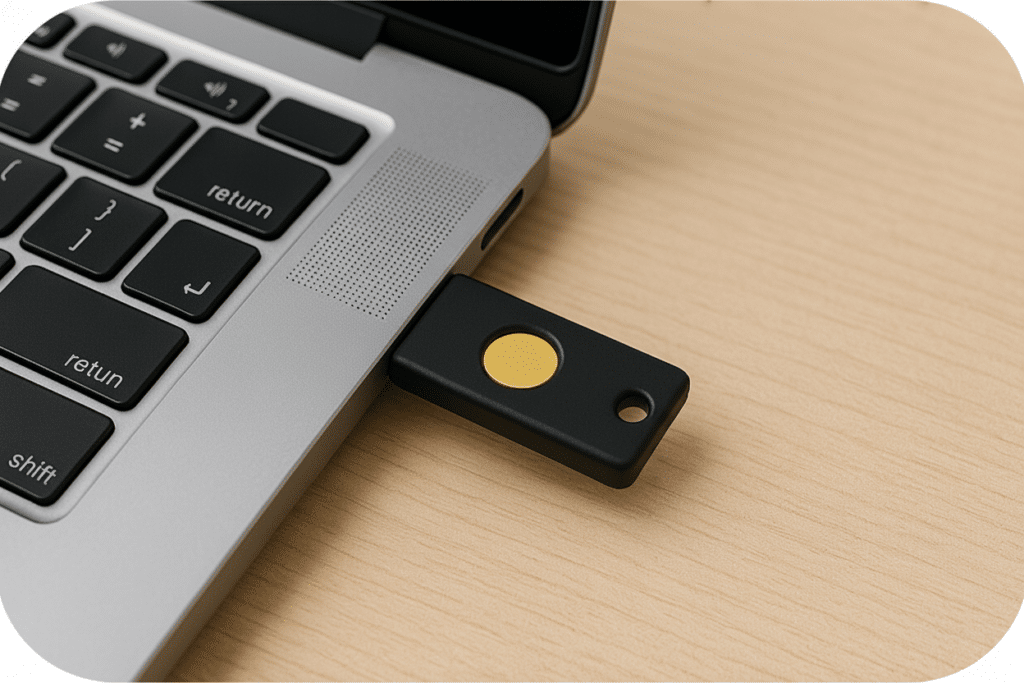
The US Cybersecurity and Infrastructure Security Agency (CISA) explicitly recommends physical security keys as the gold standard for 2FA/MFA because they resist phishing, push bombing, SIM swapping, and other common bypass hacking techniques.
What’s Actually at Risk When Gaining Access to a Google Account?
- Gmail Account
- Google Drive
- Google Chat
- Google Ads account
- Google Merchant Center
- Your Google Search
- Account History
- Payment Profiles
- Any website where you use “Login with Google,” like ChatGPT, Twitter, and many more.
A significant and concerning trend is emerging from deep research into various attack methodologies: the use of long-lived access to compromise accounts. Attackers are purchasing remotely hosted Windows computers from hosting providers – these “virtual computers” maintain a constant state. This technique allows them to log into a Gmail account and remain continuously authenticated for months at a time, as Google doesn’t require re-authentication.
This prolonged, undetected access enables a high level of impersonation. Attackers can engage in conversations while simultaneously deleting both sent messages and replies, ensuring the legitimate user never sees the communication. This allows them to convincingly impersonate the account holder with a high degree of success. Typically, the hacker will launch attacks internally within an organization while impersonating the victim, which also has a high success rate. Most people are more likely to click a link coming from a co-worker rather than an unsolicited email.
What Does This Mean for Advertisers?
Attackers are targeting MCCs and individual Google Ads Accounts. There is a surge in phishing attacks directed towards advertisers that result in taking over entire Manager and individual accounts, letting attackers control hundreds of client accounts and rapidly drain budgets. Some of the risks include:
- Budgets drained: when fraudulent ads run.
- Malware injection/redirection: many fraudulent ads direct towards harmful sites.
- Damage to the account: invalid activity flags, disapprovals, and trust issues will ripple for months on some occasions.
- Actual chaos: agencies can lose access to every account in the MCC hierarchy.
It is important to note that if even ONE person in a large MCC falls for a scam, the attacker acquires the keys to an entire portfolio of accounts and can drain budgets faster than Google can respond.
At JumpFly, data privacy and security are paramount. We take the protection of your data and the security of your account hierarchy very seriously. As a matter of policy, we stay abreast of emerging threats and employ a strict, agency-wide requirement for physical authentication keys to ensure the highest level of security and access control.